For Claude Code users

Track Claude Code usage from your menu bar

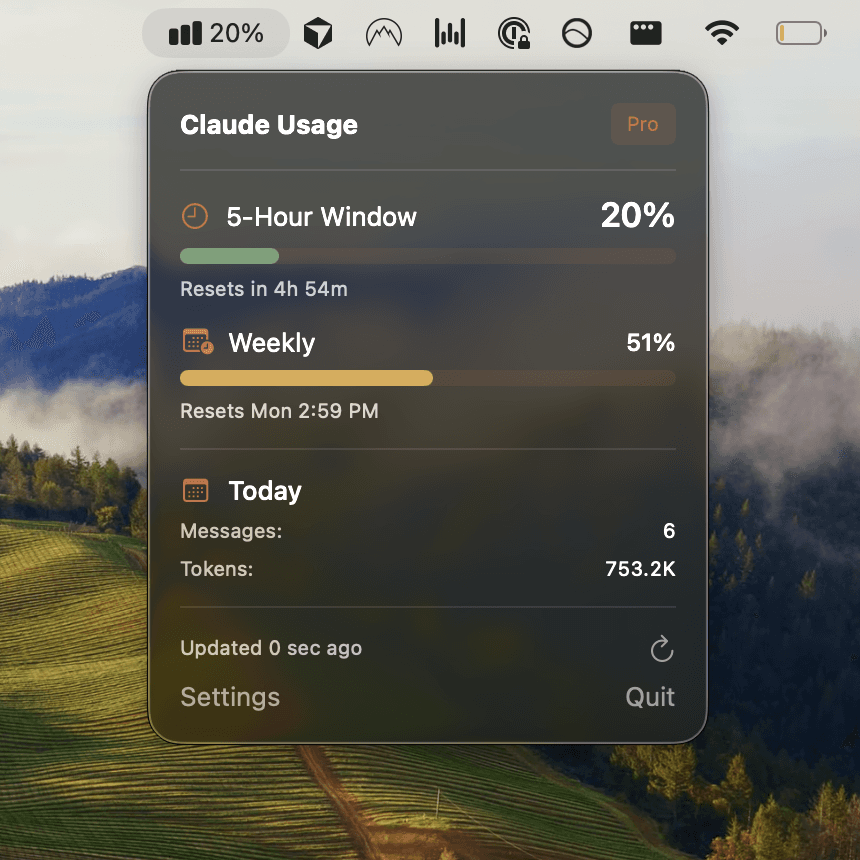
Usagebar tracks your usage limits and remaining session context, directly from your macOS menu bar. No context switching, never hit limits unexpectedly.

Get for Mac

Pay what you want. Instant download
I'm a student or can't afford this right now — download for free.

Usagebar showing Claude Code usage in the menu bar

Stay in flow

One glance at your menu bar tells you exactly where you stand. No tab switching, no dashboard hunting.

Make smarter choices

Running low? Switch to Sonnet or Haiku for lighter tasks. Save Opus for when you really need it.

Never get interrupted again

Get a ping at 90% usage so you can wrap up your PR before the 5-hour lockout hits.

Nifty tool - helps me quickly optimize usage
Joel Lee·@j0

Smart Notifications

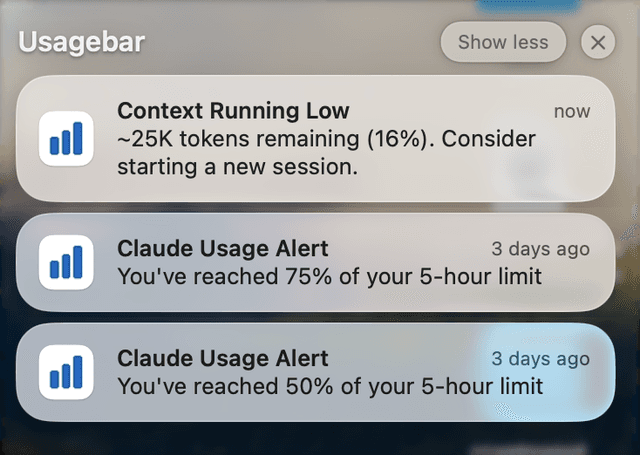
Get alerts at 50%, 75%, and 90% usage so you can wrap up your work before hitting limits. Also warns when your session context is running low.

Usagebar notifications showing usage alerts and context warnings

Reset Timers

See exactly when your next usage window opens

Secure Auth

Uses your existing Claude Code credentials via Keychain