Claude Code Weekly Limit vs 5-Hour Lockout: What You Need to Know
In this article
- What is the 5-hour limit in Claude Code?
- How is the weekly limit different from the 5-hour limit?
- The frustration: a 5-hour lockout during critical work
- How to prevent lockouts: real-time monitoring
- Plan comparison: when weekly limits actually matter
- Key differences at a glance
- Get clarity on your usage today
- Related reading
- Sources
Claude Code operates under a dual-limit system: a 5-hour session limit that resets every five hours, plus a weekly cap that prevents account abuse. Understanding the difference is critical—hitting either limit locks you out of Claude Code until the window resets. Pro plans allow approximately 45 messages per 5-hour window, while Max 5x subscribers get 225 messages and Max 20x users get 900. The weekly limit is shared across all Claude and Claude Code usage, resetting every 7 days. Usagebar tracks both windows in your macOS menu bar, eliminating the frustration of a surprise lockout mid-task.
- 5-hour limits reset independently; weekly limits reset every 7 days
- Pro: ~45 messages per 5 hours; Max 5x: ~225; Max 20x: ~900
- Fewer than 2% of users hit weekly limits with normal usage patterns
What is the 5-hour limit in Claude Code?
The 5-hour session limit is a rolling window that begins when you start using Claude Code. Every message, code generation, and API call you make counts against this allocation. Once you've exhausted your limit, you're locked out—no exceptions—until the 5-hour window closes and a new one begins. This applies whether you're on Pro ($20/month) or Max ($100-200/month).
The confusing part: the timer doesn't reset based on clock time. It resets based on when you first accessed Claude Code. If you start a session at 2 PM, your new 5-hour window opens at 7 PM, not at midnight. This means your lockout windows don't align with business hours unless you explicitly manage them. Best practices include batching related tasks together and using projects to cache content for reuse, which reduces message overhead and extends your usable window.
How is the weekly limit different from the 5-hour limit?
For a full breakdown of when each window resets, see When Does Claude Code Usage Reset?. The weekly limit is a hard cap that resets every 7 days, unlike the rolling 5-hour window. It's shared across all Claude usage—claude.ai conversations count toward it, Claude in your IDE counts toward it, and Claude Code counts toward it. This prevents account abuse and ensures no single user monopolizes Anthropic's infrastructure.
The good news: Anthropic expects fewer than 2% of users to hit the weekly limit using Sonnet 4.5 with normal usage patterns. However, intensive development sessions—especially with Claude Code generating complex code—can burn through weekly allocation faster. Max 20x users get the most generous limits (240-480 hours of Sonnet 5 per week), while Pro users get 40-80 hours. If you're hitting weekly limits consistently, upgrading from Pro to Max 5x or Max 20x typically provides 3–6x more capacity.
The frustration: a 5-hour lockout during critical work
The real problem isn't the limits themselves—it's the surprise. You're in the middle of debugging a production issue or wrapping up a PR when Claude Code suddenly locks you out for five hours. No warning. No grace period. Just a cold "usage limit reached" message.
This happens because most developers don't monitor their usage. You can check via the /usage command in Claude Code or by navigating to claude.ai/settings/usage, but constantly checking manually interrupts your workflow. You lose focus, context-switch, and waste time trying to remember where you were in your task. For developers billing clients by the hour or working under tight deadlines, a 5-hour lockout is $100+ in lost productivity.
The weekly limit adds another layer of unpredictability. You might not realize you're approaching it until you hit the wall mid-sprint. By then, you're stuck choosing between: (1) waiting for the reset, (2) paying extra for emergency access, or (3) downgrading your workflow entirely.
How to prevent lockouts: real-time monitoring
The solution is real-time visibility. Instead of manually checking /usage commands, you need a tool that tells you exactly when your limits reset—before you hit them. Smart notification systems (like 50%, 75%, and 90% alerts) give you warning instead of surprises.
Never hit a surprise lockout again — get Usagebar for your menu bar.
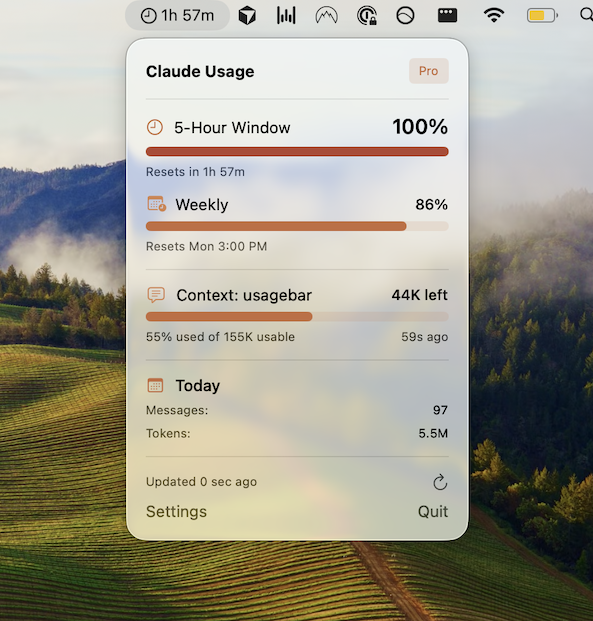
Usagebar brings Claude Code usage tracking into your macOS menu bar, showing your remaining capacity and exact reset times at a glance. You see when your 5-hour window closes and when your weekly limit resets. Notifications alert you before you run out of capacity, letting you batch remaining tasks or plan your next session accordingly. The app uses macOS Keychain for secure credential storage, so your Claude API key never touches the internet.
For developers on flexible budgets, Usagebar offers a "pay what you want" model—use it free or contribute what you think it's worth. Students get lifetime free access. It's the difference between a frustrating 5-hour lockout and a managed workflow where you stay in flow.
Plan comparison: when weekly limits actually matter
Most developers won't hit weekly limits. But certain use cases burn capacity faster:
- Max 20x (240-480 hours/week of Sonnet 5): Optimized for full-time Claude Code development. Even intensive multi-hour sessions rarely trigger limits.
- Max 5x (140-280 hours/week): Suitable for part-time development or teams sharing a single account. Daily multi-hour sessions might approach limits toward week's end.
- Pro (40-80 hours/week): Fine for casual use, but heavy Claude Code users will hit weekly limits. If you're coding for 2+ hours daily, Max 5x is probably necessary.
If you consistently hit the 5-hour limit and exhaust your weekly allocation within days, upgrading to Max likely makes financial sense. But before upgrading, use Usagebar to understand your actual usage pattern. You might discover you can optimize your workflow (batching tasks, using cached projects) to stay within Pro limits.
Key differences at a glance
5-Hour Limit: Rolling window reset every 5 hours from first use. Per-session constraint. All Pro/Max plans have individual 5-hour windows.
Weekly Limit: Resets every 7 calendar days. Shared across Claude and Claude Code. Varies by plan tier (Pro: 40-80 hours; Max 5x: 140-280 hours; Max 20x: 240-480 hours).
The 5-hour limit is your immediate concern during a session; the weekly limit is the longer-term boundary. Both require monitoring to avoid surprise lockouts.
Get clarity on your usage today
Stop checking /usage commands manually. Get Usagebar to see your remaining capacity and exact reset times in your menu bar. With smart 50%, 75%, and 90% alerts, you'll know when to wrap up a task or batch your next work session. Flexible pricing (pay what you want, free for students) means you can try it risk-free. Stay in flow. Avoid the 5-hour lockout. Know exactly when your limits reset.
Related reading
- When Does Claude Code Usage Reset?
- Claude Code Message Limit Exceeded: How to Fix
- Claude Code API vs Subscription
- How to Check Claude Code Reset Timer
- Claude Pro vs Max Limits Explained
- Does Claude Code Usage Affect Pro Limits?
- How to Reduce Claude Code Token Usage
- Claude Code vs Cursor Pricing Comparison
Sources
Never Get Locked Out Mid-Task Again
Never hit your usage limits unexpectedly. Usagebar lives in your menu bar and shows your 5-hour and weekly limits at a glance.
Get Usagebar$9 — one-time, lifetime updates