Clawdbot vs Claude Code: Which AI Tool Should You Choose?
In this article
Clawdbot and Claude Code are fundamentally different tools designed for different purposes. Clawdbot is an open-source personal AI assistant that runs locally on your machine and communicates through chat apps like WhatsApp, Telegram, and Discord. Claude Code is a specialized coding interface within the Claude ecosystem designed for software development tasks. Choose Clawdbot if you need a general-purpose AI assistant for automation and system control across messaging apps. Choose Claude Code if your primary focus is coding, debugging, and development work. Clawdbot is free and open-source, while Claude Code requires a Claude Pro or Max subscription. Clawdbot is more flexible for system automation, while Claude Code provides superior coding capabilities with integrated development tools.
What is Claude Code?
Claude Code is a coding interface available with Claude Pro and Max plans that combines AI-powered code generation with an integrated development environment. It's accessible through the Claude web interface and as a CLI tool, allowing developers to write, review, and execute code directly within the platform. Claude Code integrates with your development workflow, providing real-time code suggestions, file operations, and terminal commands.
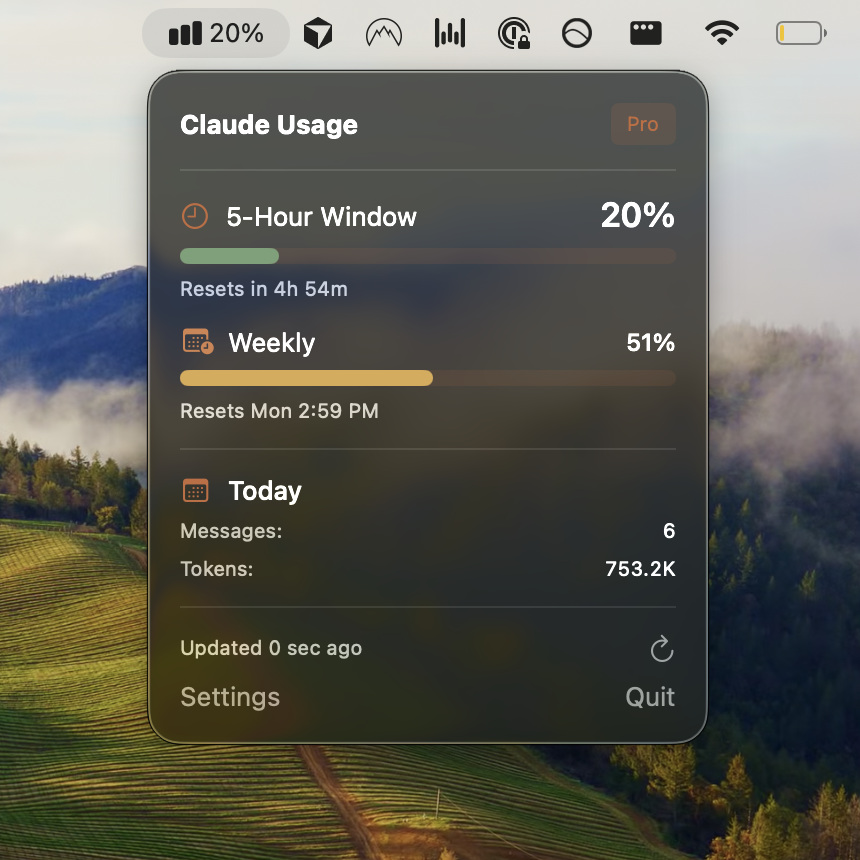
The tool is designed specifically for software engineers who want to maintain their development flow without context switching. Users can monitor Claude Code usage limits to stay within their plan's constraints, or use alternatives like Usagebar to track usage in the macOS menu bar with smart notifications at 50%, 75%, and 90% thresholds.
What is Clawdbot?
Clawdbot is an open-source AI assistant that runs entirely on your local machine, designed as a "Claude with hands." Rather than being confined to a web interface, Clawdbot integrates with messaging platforms you already use daily — WhatsApp, Telegram, Discord, Slack, Signal, and iMessage. This means you can command your AI assistant directly from your phone or messaging app without switching applications.
The key differentiator is Clawdbot's system integration capabilities. It can browse the web, manage files, execute system commands, send emails, monitor web pages, install software, and even write its own extensions (called "Skills"). The system maintains persistent memory and learns your preferences over time, creating a personalized assistant that adapts to your workflow. Best of all, Clawdbot is free and open-source, making it accessible to anyone willing to run it locally.
Key Differences: Side-by-Side Comparison
| Feature | Claude Code | Clawdbot |
|---|---|---|
| Primary Purpose | Coding & Development | General AI Automation |
| Interface | Web & CLI | Chat Apps (WhatsApp, Telegram, Discord, etc.) |
| Cost | $20/month (Pro) or $200/month (Max) | Free & Open Source |
| System Access | Code execution & terminal commands | Full system control (files, commands, browser, email) |
| Local vs Cloud | Cloud-based (via Anthropic) | Local-first (runs on your hardware) |
| Memory & Persistence | Session-based | Persistent across interactions |
| Extensibility | Limited to Claude's built-in tools | Highly extensible with custom skills |
| Chat Integration | No (separate interface) | Yes (native to messaging platforms) |
| Data Privacy | Cloud-based (Anthropic servers) | Local (your machine only) |
When to Use Claude Code
Claude Code is the right choice if you're a software developer focused on coding tasks. Use it when you need:
- Intelligent code generation and completion
- Real-time code review and suggestions
- Integrated terminal access within your development environment
- File management directly tied to coding projects
- Seamless debugging with AI assistance
- The latest Claude models optimized for code understanding
If you're concerned about tracking your usage and avoiding surprise lockouts during critical tasks like finishing a PR, Usagebar offers real-time usage monitoring in your macOS menu bar, with flexible pay-what-you-want pricing and free options for students. This prevents the frustration of hitting a usage limit mid-development.
When to Use Clawdbot
Clawdbot is ideal if you want a general-purpose AI assistant for automation and system control. Use it when you need:
- AI assistance available in your messaging apps (WhatsApp, Telegram, Discord)
- System automation (running scripts, managing files, installing software)
- Web monitoring and browsing capabilities
- Email automation and task scheduling
- An assistant that learns and remembers your preferences
- Full privacy with local-first operation
- Custom extensions and skills tailored to your workflow
Clawdbot excels at proactive tasks — cron jobs, reminders, background monitoring — making it feel more like an AI teammate than a tool you invoke on demand.
Pricing & Accessibility
The cost difference is dramatic. Claude Code requires a Claude subscription ($20/month for Pro, $200/month for Max), though some usage is included. Clawdbot is completely free and open-source, requiring only that you run it on your own hardware. This makes Clawdbot accessible to developers and non-developers alike.
However, if you choose Claude Code and want peace of mind about your usage, Usagebar provides a lightweight alternative to constant checking. Unlike clicking into settings or using the /usage slash command, Usagebar's menu bar integration keeps you informed without breaking focus.
Architecture: Local vs Cloud
Claude Code operates as a cloud service — your code and context live on Anthropic's servers. This provides reliability and consistent performance but means your data isn't stored locally.
Clawdbot's architecture is fundamentally different: it runs entirely on your own machine. This local-first design means your context, skills, and interactions never leave your hardware. You control the data completely, making Clawdbot the choice for teams or individuals with strict privacy requirements.
Development Workflow: Coding vs Automation
Claude Code keeps developers in their coding flow. You write code, test it, debug it, and execute terminal commands without leaving the interface. The tool is optimized for the coding lifecycle.
Clawdbot operates outside traditional development workflows. It's a proactive assistant that can run scheduled tasks, monitor systems, send notifications, and integrate with services — all from a chat interface. While both can execute code, Claude Code is purpose-built for development while Clawdbot is designed for system automation and general assistance.
Which Tool Should You Actually Use?
The decision depends on your primary use case:
- Use Claude Code if: You spend most of your time writing, reviewing, and debugging code. You want AI integrated into your development environment. You're comfortable with cloud-based tools and want the latest AI-powered coding features.
- Use Clawdbot if: You need a general-purpose AI assistant for automation and system control. You value privacy and want everything running locally. You prefer accessing AI through chat apps you already use daily. You want to save money — Clawdbot is free.
- Use Both if: You're a developer who wants Claude Code for coding work AND needs system automation capabilities. Many engineers use both for different purposes.
For Claude Code users concerned about usage tracking, Usagebar provides instant menu bar visibility with smart alerts. This small addition to your workflow prevents the frustration of unexpected usage limits during critical development moments.
The Bottom Line
Clawdbot and Claude Code aren't competitors — they solve different problems. Think of it like comparing VS Code (a code editor for developers) with Slack (a communication platform for teams). Both are essential, but you wouldn't use one to replace the other.
Claude Code is specialized, powerful, and built for development. Clawdbot is flexible, local, and built for everything else. If you're a developer using Claude Code, consider Usagebar to stay informed about your usage without constant context switching. If you're drawn to Clawdbot's automation capabilities, you get a free, open-source tool that respects your privacy and integrates seamlessly into your existing chat workflows.
Sources
Never Get Locked Out Mid-Task Again
Never hit your usage limits unexpectedly. Usagebar lives in your menu bar and shows your 5-hour and weekly limits at a glance.
Get Usagebar$9 — one-time, lifetime updates