How to Do API Testing on Claude Code: Test Automation Without the Context Switching
In this article
API testing with Claude Code eliminates the friction of context-switching between documentation, test frameworks, and debugging logs. Instead of wrestling with verbose test configs, describe what you want tested—"write integration tests for the checkout API with mock payment flows"—and Claude writes, executes, and debugs tests autonomously across Jest, Vitest, Playwright, and Cypress.
Usagebar keeps your usage window visible in the macOS menu bar, so you know exactly how much Claude capacity you've burned during test runs. No more surprises when deep testing sessions hit the 5-hour lockout during critical deployment windows.
Key advantages: Dynamic test generation from plain language, intelligent error diagnosis, framework auto-detection, and flaky test resolution without manual rewrites. For teams and solo developers, this approach treats testing as an intelligent, self-improving process rather than static, brittle scripts.
Understanding Claude Code's testing approach
Claude Code Skills transform testing through AI automation. Rather than you writing boilerplate test files, you delegate the entire workflow—generation, execution, debugging, and iterative fixes—to Claude.
The key difference from traditional testing: Claude doesn't just scaffold tests. It writes framework-aware tests (using React Testing Library for React apps, role-based selectors for Playwright), executes them immediately, parses failures, diagnoses root causes, and applies targeted fixes. When you hit a flaky test, Claude analyzes timing issues and selector brittleness, then re-runs to confirm the fix.
How to write API tests with Claude Code
The workflow is conversational and iterative:
Step 1: Describe your test scenario in natural language
Instead of handwriting test boilerplate, tell Claude what endpoints to test and what behavior you expect:
- "Write tests for the /api/users POST endpoint. Mock authentication, validate response schema, and test error handling for invalid email."
- "Generate integration tests for the payment API with mock Stripe responses and retry logic."
- "Create E2E tests for the checkout flow, including cart validation and order confirmation."
Step 2: Let Claude detect your framework and tech stack
Claude examines your project files and chooses the right framework:
- Jest projects get Jest-specific test syntax with proper mocking.
- Playwright projects get resilient role-based selectors over brittle ID-based ones.
- API-first projects get raw HTTP client tests (curl, axios, fetch) with proper assertion libraries.
Step 3: Claude writes, runs, and fixes tests in one go
Claude Code generates complete test suites with assertions, cross-browser setup, and error handling. It then runs the tests, parses the output, identifies failures, and applies fixes—all without asking you to re-execute commands or manually debug logs.
Step 4: Intelligent failure diagnosis
When tests fail, Claude doesn't just report the error. It analyzes whether the issue stems from:
- Brittle selectors (fixes by switching to role-based queries)
- Timing issues (adds intelligent waits and retries)
- Mock data mismatches (updates mocks to match actual API behavior)
- API contract changes (flags schema mismatches)

Advanced API testing patterns
Combining Claude Code with Apidog CLI
You can integrate Apidog CLI with Claude Skills to build an efficient workflow for natural-language-driven API automation testing. The pattern: use Apidog to validate API contracts (status codes, response schemas), then use Claude Code for integration and E2E tests that depend on those contracts. If Apidog tests fail, skip E2E tests to prevent false negatives.
Flaky test resolution
Intermittent test failures are a common pain point. Claude diagnoses flaky tests by:
- Examining failure patterns across multiple runs
- Identifying timing-sensitive operations (API delays, DOM rendering)
- Re-running tests with increased timeouts or retry logic
- Confirming fixes work consistently before marking tests stable
CI/CD integration
Use Claude Code with pre-commit and pre-push hooks to prevent broken tests from entering your repository:
- Pre-commit: Run unit tests locally before staging
- Pre-push: Run full integration and API test suites before pushing to remote
- In CI/CD: Let Claude handle test generation and debugging for pull requests
Managing usage during intensive testing sessions
API testing sessions can consume significant Claude usage—especially when Claude is generating multiple test suites, debugging failures, and re-running tests for flaky fixes. This is where Usagebar becomes critical.
Usagebar displays your Claude usage in the macOS menu bar with smart notifications at 50%, 75%, and 90% capacity. This means you'll see exactly when you're approaching usage limits before a 5-hour lockout interrupts a critical testing session.
Why this matters: Imagine you're in the final hour before a production release, writing comprehensive API tests for a new payment integration. You're deep in Claude Code, debugging flaky timing issues, and re-running test suites. Without visibility into usage, you could suddenly hit a lockout. Usagebar keeps you informed so you can plan test runs strategically—run extensive suites during low-usage periods, or defer non-critical tests to the next usage window.
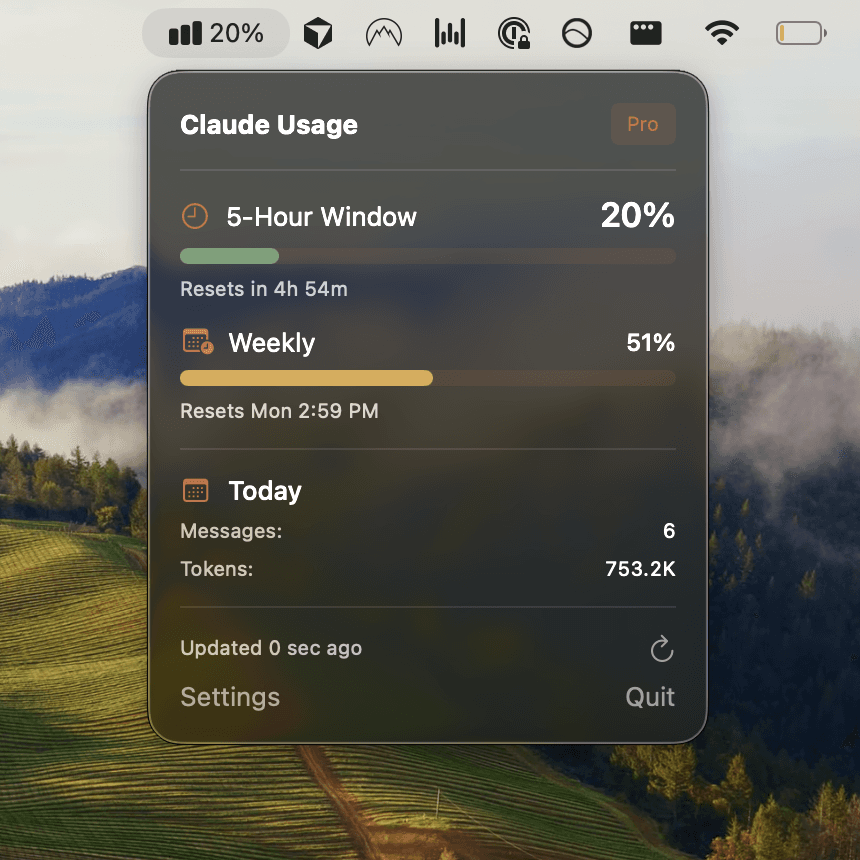
Usagebar also securely stores your Anthropic API credentials in macOS Keychain, so you're not managing plaintext tokens. Download Usagebar instantly with flexible pricing—pay what you want, with free access for students.
Key takeaways for API testing on Claude Code
- Describe test scenarios in natural language. Tell Claude what to test, not how to write tests. Let it handle boilerplate and framework specifics.
- Claude auto-detects your tech stack. It writes framework-aware tests for Jest, Playwright, Cypress, or raw HTTP clients without explicit configuration.
- Tests are run, debugged, and fixed autonomously. Claude executes tests, analyzes failures, and applies targeted fixes—all in one flow.
- Combine with Apidog for full-stack validation. Use Apidog to validate API contracts, then Claude Code for integration and E2E tests.
- Monitor your usage relentlessly. Use Usagebar to keep track of capacity during intensive testing sessions and avoid mid-task lockouts.
- Treat testing as an intelligent process. Instead of maintaining brittle, static test files, let Claude incrementally improve tests as your codebase evolves.
Getting started
Start with simple API tests and gradually expand:
- Open Claude Code and describe a single API endpoint to test: "Write tests for the /api/health endpoint."
- Let Claude generate, run, and debug the tests.
- Expand to multi-step flows: "Write tests for user signup, login, and profile updates with error cases."
- Integrate with Apidog for contract validation if working with external APIs.
- Set up Usagebar in your macOS menu bar to stay aware of usage during long testing sessions.
For more details on Claude Code capabilities, see the official slash commands documentation. And for testing best practices specific to Claude, check out how to do unit testing on Claude Code and best Claude Code commands for developers.
Sources
- Claude Code Slash Commands and Skills Documentation
- Claude Code Web App Testing in 2026 – Apidog
- Apidog CLI + Claude Skills: Integrating API Automation Testing – Apidog
- Using Claude Code with Your Pro or Max Plan – Anthropic Support
- How to Do Unit Testing on Claude Code – Usagebar
- Best Claude Code Commands for Developers – Usagebar
Never Get Locked Out Mid-Task Again
Never hit your usage limits unexpectedly. Usagebar lives in your menu bar and shows your 5-hour and weekly limits at a glance.
Get Usagebar$9 — one-time, lifetime updates