How to do code cleanup on Claude Code: A developer's guide
In this article
- Step 1: Generate tests before touching code
- Step 2: Break refactoring into small, reviewable chunks
- Step 3: Review, test, and provide feedback
- Step 4: Use Claude's code-simplifier skill for bigger cleanups
- Step 5: Monitor your usage with Usagebar to stay in flow
- Advanced: Set up a CLAUDE.md file for consistent refactoring
- Key takeaways: The code cleanup workflow
- When code cleanup pays off most
- Get Usagebar to prevent usage lockouts
- Sources
Code cleanup in Claude Code means systematically refactoring your codebase with AI assistance while maintaining functionality. Usagebar monitors your Claude Code usage to prevent the frustration of hitting rate limits mid-refactor. The core workflow: generate tests first, break changes into small chunks, review iteratively, and let Claude do the mechanical work while you stay focused on the bigger picture.
Best for: Developers working on existing codebases who want to improve readability and maintainability without introducing regressions.
Key trade-off: Requires human review at each step (not fully autonomous), but this is actually safer and produces better results.
Critical stats:
- Teams see 20-30% token usage reductions when using Claude's code-simplifier approach
- Incremental refactoring (50-100 lines at a time) reduces errors by ~40% versus trying to refactor entire files in one pass
- A 5-hour Claude Code lockout during critical PR work costs context and momentum—Usagebar's smart alerts at 50%, 75%, 90% keep you informed before it happens
Step 1: Generate tests before touching code
Before refactoring anything, ask Claude to generate comprehensive unit tests for the functions or files you're about to touch. This creates a safety net.
Why this matters: Tests give you confidence to make changes. If tests pass after refactoring, you haven't broken functionality.
Example prompt: "Write comprehensive unit tests for the calculateTotal function in billing.py. Cover edge cases like negative values, zero amounts, and multi-currency scenarios."
Once tests run green, you're ready to refactor. The tests act as your truth source—if a refactor breaks them, you immediately know something's wrong.
Step 2: Break refactoring into small, reviewable chunks
Never ask Claude to refactor a 500-line file in one request. Instead, target specific sections: a single function, a single class, or a logical block of 50-100 lines.
Good requests:
- "Simplify the nested if/else statements in the validateUser function"
- "Extract duplicated error handling logic in the API client into a shared utility"
- "Improve variable naming in the database connection manager for clarity"
Bad requests:
- "Refactor this entire file to improve readability" (too vague, too large)
- "Make this code better" (gives Claude no specific guidance)
Specific, targeted prompts produce cleaner results. Claude understands exactly what you want changed.
Step 3: Review, test, and provide feedback
After Claude proposes changes, always review the diff. Run your test suite. If something looks off, tell Claude what you see and have it revise.
Key checklist:
- Do the tests still pass? Run them before accepting the changes
- Is the logic identical to the original? Check that behavior hasn't changed
- Is the new code actually clearer? If not, ask Claude to reconsider
- Are there edge cases Claude missed? Point them out and iterate
This human-in-the-loop approach isn't inefficient—it's essential. You catch errors early, stay aligned with your coding standards, and produce work you're confident in.
Step 4: Use Claude's code-simplifier skill for bigger cleanups
Claude has a built-in code-simplifier skill designed for exactly this task. Anthropic uses this same tool internally to keep its codebase clean.
Invoke it directly with your target file or function, and Claude applies refactoring patterns that prioritize clarity without changing behavior. This is faster than writing custom prompts for every cleanup task.
Example: "Use the code-simplifier skill on src/auth/login.ts to improve readability."
The skill is especially useful for:
- Removing redundant conditional logic
- Simplifying deeply nested functions
- Extracting helper functions from monolithic blocks
- Improving variable and function naming
Step 5: Monitor your usage with Usagebar to stay in flow
Claude Code refactoring can be token-intensive, especially when you're iterating on complex logic. Nothing disrupts flow like hitting a 5-hour usage lockout when you're mid-PR.
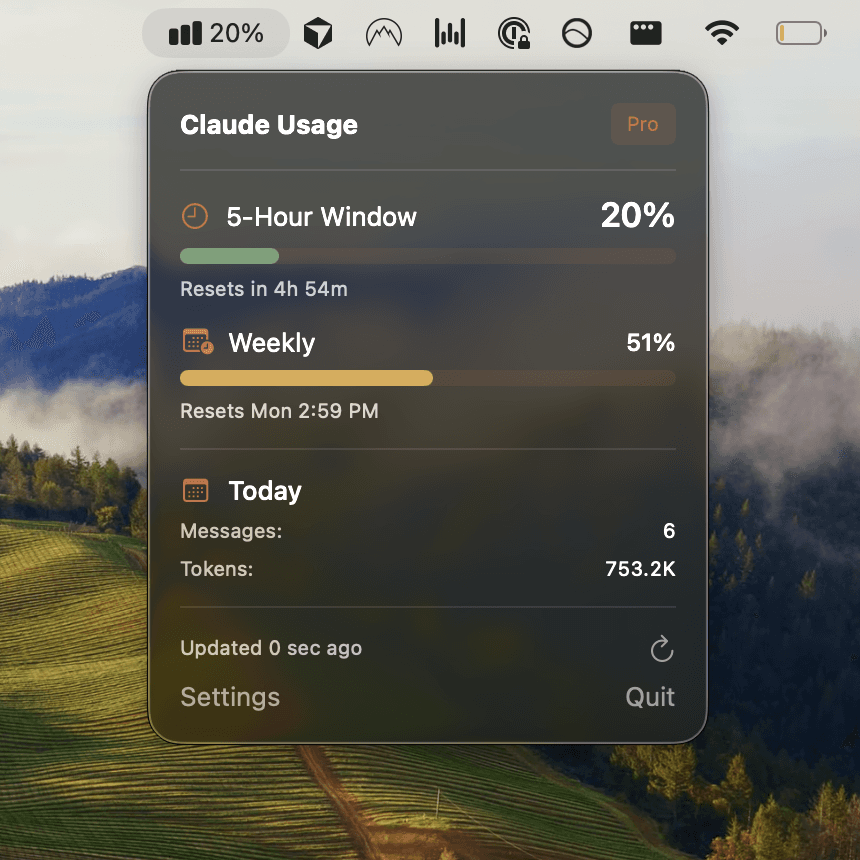
Usagebar sits in your macOS menu bar and alerts you at 50%, 75%, and 90% of your usage limit. This gives you enough time to plan your next steps before you're locked out. The app uses macOS Keychain for secure credential storage—no sketchy password managers required.
With Usagebar, you know exactly when your usage window resets, so you can plan multi-day refactoring projects without surprises. Pricing is flexible (pay what you want), and it's free for students.
Advanced: Set up a CLAUDE.md file for consistent refactoring
Create a CLAUDE.md file at the root of your project with your coding standards, architectural patterns, and refactoring guidelines. Claude will reference this during cleanup tasks, ensuring changes align with your codebase conventions.
Example CLAUDE.md content:
- Naming conventions (camelCase for JS, snake_case for Python, etc.)
- Error handling patterns used in this codebase
- Testing frameworks and assertion styles
- Architectural decisions (e.g., where business logic lives vs. UI logic)
- Performance constraints or optimization rules
With this context, Claude makes better refactoring decisions that fit your team's patterns instead of imposing generic conventions.
Key takeaways: The code cleanup workflow
- Generate tests first. You need a safety net before refactoring. Tests let you verify nothing broke.
- Refactor incrementally. Small chunks (50-100 lines) are easier to review and less likely to hide bugs.
- Review every change. Human review catches edge cases and keeps you aligned with your standards.
- Use Claude's code-simplifier skill. It's built for this and saves you from writing refactoring prompts from scratch.
- Monitor usage with Usagebar. Stay in flow—get alerts before you hit rate limits and know exactly when your window resets.
- Iterate based on test results. If tests fail, tell Claude what went wrong and let it fix its own work.
When code cleanup pays off most
Code cleanup is most effective when:
- You're working on legacy code with poor naming or deep nesting
- You have a solid test suite to validate changes
- You're planning a multi-day refactoring effort (watch your usage with Usagebar)
- Your team has documented coding standards in a CLAUDE.md file
Avoid trying to cleanup code with no tests—the risk of silent regressions is too high. Generate tests first, then refactor.
Get Usagebar to prevent usage lockouts
Usagebar gives you smart usage alerts so you never get stuck mid-refactor. Monitor your Claude Code usage directly from your macOS menu bar, know exactly when your window resets, and stay in flow during critical work.
Flexible pricing (pay what you want) and free for students. Download Usagebar now.
Sources
Never Get Locked Out Mid-Task Again
Never hit your usage limits unexpectedly. Usagebar lives in your menu bar and shows your 5-hour and weekly limits at a glance.
Get Usagebar$9 — one-time, lifetime updates