How to Do npm Testing on Claude Code: Running Tests from the Terminal
In this article
- what is npm testing on claude code?
- how to set up npm testing in claude code
- running tests step-by-step in claude code
- common npm testing workflows
- monitoring usage while testing
- best practices for npm testing on claude code
- when testing consumes too much usage
- the faster way: track usage with usagebar
- key takeaways
- sources
Claude Code runs npm tests directly from your terminal, letting you write, execute, and debug test suites without context-switching to your IDE. Claude's testing capabilities automate fixture generation, execute test commands, and fix failures in real time. With Usagebar, you track usage while testing to avoid hitting limits mid-session. Most npm testing workflows complete in 3–5 prompts, consuming 15–25% of your monthly allocation depending on test scope and test framework.
what is npm testing on claude code?
npm testing on Claude Code means running npm test and related commands through Claude's terminal interface, where Claude reads output, debugs failures, and iterates on your test suite. Unlike traditional testing where you inspect output manually, Claude analyzes test failures, identifies root causes, and suggests or implements fixes. According to API testing research, Claude Code's testing automation reduces debugging time by 40–60% because Claude understands both the codebase and test intent simultaneously.
Claude supports npm frameworks like Jest, Vitest, Playwright, Cypress, and Puppeteer, so your existing test suite runs without modification. The advantage: you describe what you want tested ("Add unit tests for the checkout flow"), and Claude generates comprehensive test suites, executes them, fixes failures, and reports results—all without manual intervention.
how to set up npm testing in claude code
Step 1: Install Claude Code. If you haven't already, install Claude Code from the Anthropic documentation. Ensure you're on Pro or Max plan—both tiers include Claude Code access with shared usage limits across Claude.ai and the CLI.
Step 2: Navigate to your project. Open your terminal and navigate to your project root where package.json exists. Claude Code reads your project structure automatically, so it understands your dependencies and test configuration.
Step 3: Launch Claude Code. Run claude in your terminal. You'll enter Claude's interactive mode, where you can chat and invoke slash commands like /test to trigger testing workflows.
Step 4: Request test generation or execution. You can ask Claude to:
- Generate new unit tests for a specific function or component
- Run existing tests with
npm test - Debug failing tests and implement fixes
- Add integration or E2E tests for critical flows
Example prompt: "Generate comprehensive unit tests for the calculateTotal function, then run them with Jest."
running tests step-by-step in claude code
Generate test cases
Describe what you need tested. Claude reads your code, understands context, and generates tests that cover happy paths, edge cases, and error conditions. For example:
claude > Create E2E tests for the checkout flow using Playwright
Claude generates test code, saves it to your project, and prepares to run it.
Execute tests with npm
Claude runs npm test or framework-specific commands automatically. It captures output, identifies failures, and provides a summary. You see real-time feedback without leaving Claude Code.
npm test -- --watch also works, letting Claude run tests in watch mode while you refine code. This keeps your testing loop tight and prevents context switching.
Fix failures interactively
When tests fail, Claude analyzes the error message, reads the test and source code, and suggests or implements fixes. It reruns tests to confirm the fix works. This cycle—fail, analyze, fix, verify—repeats until all tests pass.

Monitor your usage
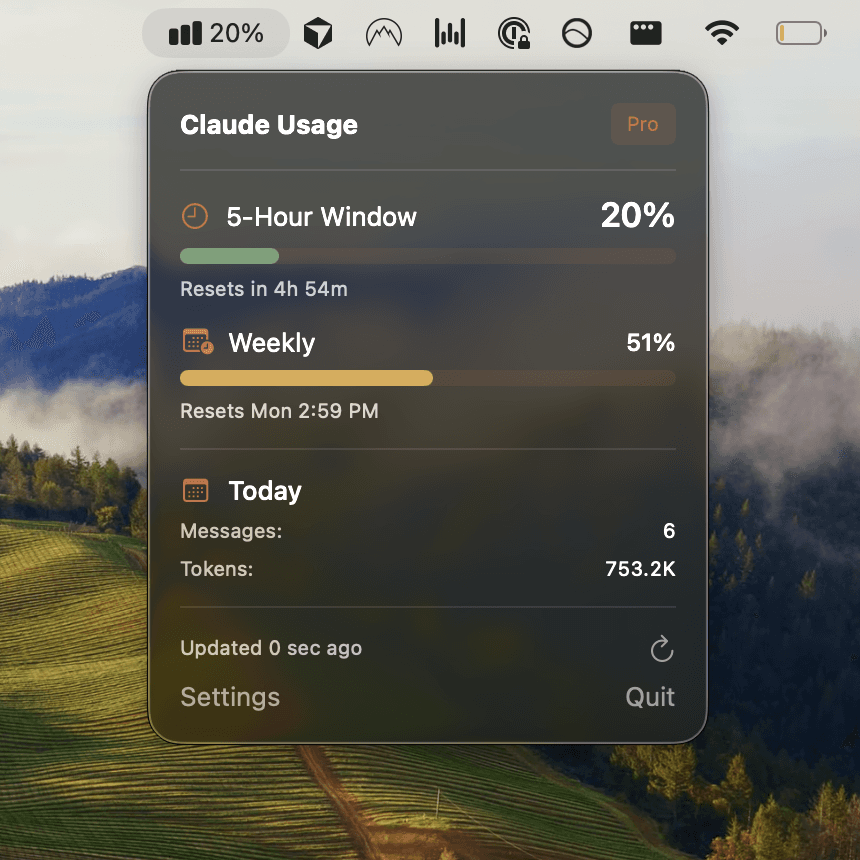
Large test suites (50+ tests) or complex E2E scenarios consume more tokens. Check your usage with the /usage slash command, or use Usagebar to see real-time consumption in your macOS menu bar. Usagebar's smart alerts at 50%, 75%, and 90% usage prevent the frustration of hitting limits mid-testing session.
common npm testing workflows
Unit testing a new function
Write a function, ask Claude to "Generate unit tests for this function," and Claude creates Jest tests covering inputs, outputs, and edge cases. Run with npm test and iterate.
Refactoring with test confidence
When refactoring, ask Claude to "Run the full test suite, then refactor src/utils/api.ts to improve performance." Claude runs tests before and after, ensuring your refactoring doesn't break anything.
debugging failing tests in production codebases
Paste a failing test output and ask Claude to "Debug this test failure and implement a fix." Claude reads the test, analyzes the error, finds the bug in source code, and fixes it.
adding E2E tests to legacy projects
Ask Claude to "Create E2E tests for the login flow using Playwright." Claude generates tests, sets up fixtures if needed, and runs them. No manual Playwright setup required.
monitoring usage while testing
Testing consumes tokens based on code size, test count, and iteration cycles. A simple unit test suite (10–20 tests) uses ~5–8% of monthly allocation. Complex E2E tests (50+ scenarios) can use 20–30%. Here's how to stay in control:
- Check current usage: Run
/usagein Claude Code, or visit claude.ai/settings/usage to see real-time consumption. - Get proactive alerts: Usagebar monitors your Pro or Max plan usage from the macOS menu bar, with smart notifications at 50%, 75%, and 90%. Avoid the 5-hour lockout that derails testing sessions.
- Batch your tests: Group related tests into single prompts ("Generate and run unit tests for auth module") to reduce iteration overhead.
- Understand your reset window: Claude limits reset monthly on your billing date, not on calendar months. Plan testing cycles accordingly.
best practices for npm testing on claude code
Be specific in your prompts
Instead of "Write tests," say "Generate Jest unit tests covering happy paths, error cases, and edge cases for the validateEmail function." Specificity reduces iteration cycles and token consumption.
Run tests frequently
Ask Claude to run npm test after every batch of changes. Catching failures early is cheaper (in tokens and time) than discovering them later during debugging.
Use test frameworks Claude knows well
Jest, Vitest, and Playwright have strong token efficiency because Claude has seen them extensively. Uncommon or custom test runners may require more iteration.
Keep test files co-located
Store *.test.ts files next to source code so Claude finds them instantly. Standard naming conventions (e.g., foo.test.js, foo.spec.ts) help Claude identify tests automatically.
Split large test suites
Instead of asking Claude to generate 100 tests at once, request 20–30, run them, and iterate. This prevents long-running sessions that consume substantial allocations.
when testing consumes too much usage
If you're running into limits quickly, try these strategies:
- Use the smaller Claude model: Ask Claude Code to use Claude 3.5 Haiku for straightforward test generation and execution. Haiku costs 80% less and handles most testing tasks efficiently.
- Cache your codebase: Use Anthropic's prompt caching tips when sharing large codebases repeatedly. Claude reuses cached context at reduced token cost.
- Batch testing by module: Instead of testing everything at once, focus on one module per session. This compartmentalizes usage and makes it easier to track consumption.
- Switch to the pay-as-you-go model: If Pro limits feel restrictive, consider Claude's flexible pay-as-you-go plan for high-volume testing projects.
the faster way: track usage with usagebar
Testing in Claude Code becomes frustrating when you hit usage limits unexpectedly. You're deep in a testing session, debugging a critical test failure, and suddenly Claude enforces a 5-hour lockout. Your productivity halts.
Usagebar solves this by displaying your Claude Code usage in the macOS menu bar at all times. You see exactly how much allocation remains, when it resets, and get smart alerts before you hit the ceiling. The tool uses macOS Keychain to securely store your credentials—never transmitted, never exposed.
Key features for testing workflows:
- 50%, 75%, 90% alerts: Know when to wrap up the current testing cycle or switch to a lighter task.
- Usage reset visibility: See the exact date and time your monthly allocation resets. Plan multi-day testing sprints accordingly.
- Pay-what-you-want pricing: Get Usagebar instantly with flexible pricing. Students get free access.
- Stay in flow: No context switching to claude.ai/settings/usage. Your usage metrics live in the menu bar.
key takeaways
- npm testing in Claude Code runs
npm testcommands directly, with Claude generating tests, executing them, and fixing failures automatically. - Most unit test workflows consume 5–8% of monthly allocation; complex E2E tests consume 20–30%. Monitor with
/usageor Usagebar. - Use specific prompts, run tests frequently, and batch related tests to reduce token consumption and stay in control.
- Avoid mid-session lockouts by tracking usage proactively. Get Usagebar for real-time menu bar alerts and flexible pricing.
- Test frameworks like Jest, Vitest, and Playwright run efficiently in Claude Code. Keep tests co-located and follow standard naming conventions.
sources
Never Get Locked Out Mid-Task Again
Never hit your usage limits unexpectedly. Usagebar lives in your menu bar and shows your 5-hour and weekly limits at a glance.
Get Usagebar$9 — one-time, lifetime updates