How to Do PostgreSQL Migrations on Claude Code
In this article
- What are PostgreSQL migrations and why use Claude Code for them?
- How to set up your migration tool before starting
- How to generate a new migration file with Claude Code
- How to handle multi-step migrations safely
- How to review and test migrations with Claude Code
- How to use Claude Code slash commands during a migration session
- How to monitor usage during long migration sessions
- Key takeaways
- Sources
The fastest way to handle PostgreSQL migrations in Claude Code is to open your project, describe the schema change you need in plain English, and let Claude generate the migration file for your chosen tool (Flyway, Liquibase, node-pg-migrate, or raw SQL scripts). Claude can write, review, and sequence migrations, but you still run them yourself. For heavy migration sessions, watch your usage with Usagebar so a 5-hour lockout doesn't catch you mid-PR.
- Works with any migration tool: Flyway, Liquibase, Alembic, Prisma Migrate, node-pg-migrate
- Claude Code handles file naming conventions, versioning prefixes, and rollback SQL
- Usage-intensive: generating, reviewing, and debugging a migration chain can burn through tokens quickly
What are PostgreSQL migrations and why use Claude Code for them?
A database migration is a versioned, incremental change to your schema: adding a column, creating an index, renaming a table, or backfilling data. Keeping migrations as discrete, ordered files lets your team replay the full schema history from scratch and roll back safely.
Claude Code is useful here because migration SQL is verbose, error-prone, and repetitive. Describing your intent ("add a non-nullable tenant_id UUID column to users with a default and a foreign key") is faster than hand-writing the DDL, and Claude will flag issues like missing NOT NULL defaults that would block a zero-downtime deploy.
How to set up your migration tool before starting
Before generating any migration files, make sure Claude Code knows which tool your project uses. If you haven't connected Claude Code to your Postgres instance yet, the guide on setting up a Postgres database connection in Claude Code covers the environment variable and connection string setup.
Tell Claude which framework you're using
Open Claude Code in your project root and start with a brief context prompt:
We use Flyway for PostgreSQL migrations. Migrations live in db/migration and follow the V{version}__{description}.sql naming convention.
If your project uses Prisma, the prompt changes:
We use Prisma Migrate. The schema file is prisma/schema.prisma. Generate migration SQL compatible with prisma migrate dev.
Claude will respect these conventions for every subsequent file it generates in the session.
How to generate a new migration file with Claude Code
Once context is set, describe the change in plain English. Be specific about data types, nullability, indexes, and any backfill logic:
Generate a Flyway migration to add a `subscription_tier` enum column (values: free, pro, enterprise) to the `accounts` table. It should default to 'free', be NOT NULL, and have an index. Include a rollback script.
Claude will output a versioned .sql file with both the forward migration and an undo script if your tool supports it. Review the output for:
- Correct column constraints (
NOT NULL,DEFAULT,CHECK) - Index creation outside the transaction block (required for
CREATE INDEX CONCURRENTLYin Postgres) - Enum handling: Postgres enums require a separate
CREATE TYPEstatement - Backfill
UPDATEstatements placed before adding theNOT NULLconstraint
How to handle multi-step migrations safely
Zero-downtime schema changes often require multiple migration files deployed across releases. A common pattern: add a nullable column in migration 1, backfill in migration 2, add the NOT NULL constraint in migration 3. Ask Claude to plan the full sequence upfront:
I need to rename the `user_name` column to `display_name` in a zero-downtime way. Our app uses Flyway and deploys continuously. Plan the migration sequence.
Claude will lay out each step and explain the deployment window required between them. This is particularly useful when the sequence involves adding a trigger or a generated column as a transition mechanism.
Sequencing migrations across environments
If your project uses data seeding alongside schema migrations, Claude can help coordinate the order: schema change first, seed scripts second. Mention your environment setup so Claude doesn't generate Postgres-version-specific syntax that breaks on staging.
How to review and test migrations with Claude Code
Paste an existing migration into the conversation and ask Claude to audit it:
Review this migration for correctness, performance impact, and any locking issues on a table with 50M rows.
Claude will flag operations that take an ACCESS EXCLUSIVE lock (like ALTER TABLE ... ADD COLUMN NOT NULL without a default in older Postgres versions) and suggest safe alternatives. It can also generate a rollback migration from a forward migration if one wasn't included.
Running the migration
Claude Code does not execute migrations directly against your database. You apply them through your standard CLI:
- Flyway:
flyway migrate - Liquibase:
liquibase update - Prisma:
npx prisma migrate dev - node-pg-migrate:
node-pg-migrate up - Alembic:
alembic upgrade head
Run these in a terminal tab alongside Claude Code. If a migration fails, paste the error output back into Claude for a targeted fix.
How to use Claude Code slash commands during a migration session
Claude Code's slash commands are useful for keeping a long migration session organized:
/clear: Reset context between unrelated migration tasks to reduce token usage/usage: Check how much of your usage window you've consumed mid-session/compact: Summarize a long conversation to free up context for the next migration file
Migration sessions are token-intensive. Claude reads schema files, generates SQL, explains decisions, and iterates on feedback. A complex migration chain can consume a meaningful portion of your 5-hour usage window. Knowing where you stand prevents the worst-case scenario: Claude going offline while you're mid-way through a PR that touches 12 tables.
How to monitor usage during long migration sessions
You can check your usage at any time via /usage in Claude Code or by visiting claude.ai/settings/usage. But both require you to context-switch away from your terminal. A better approach for active sessions is Usagebar, a macOS menu bar app that keeps your Claude Code usage visible at all times.
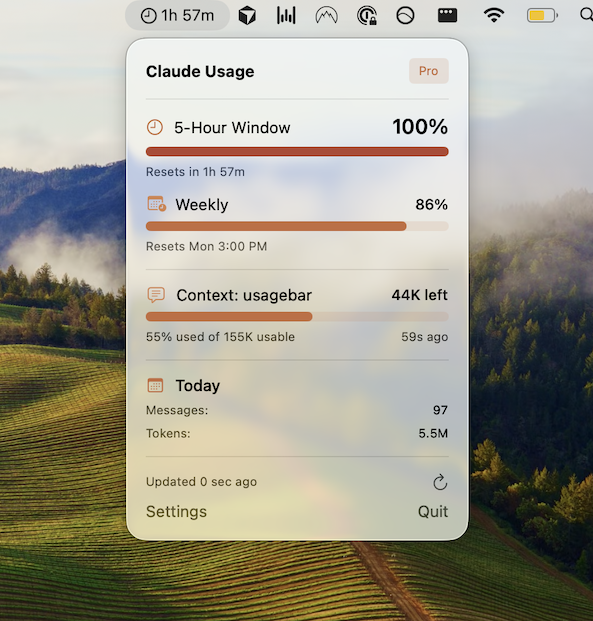
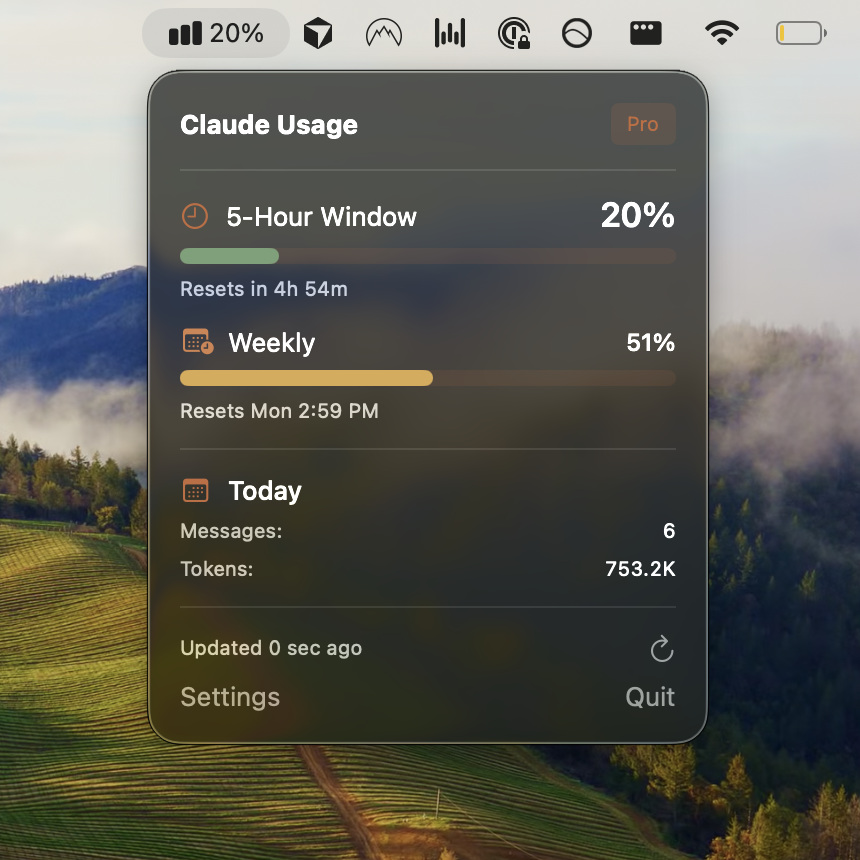
Usagebar shows your current usage percentage, sends notifications at 50%, 75%, and 90% thresholds, and displays exactly when your 5-hour window resets. Credentials are stored in the macOS Keychain. Pricing is pay-what-you-want, with a free option for students.
For more on tracking limits, see the guide on how to check Claude Code usage limits and when Claude Code usage resets.
Get Usagebar — instant download, flexible pricing, free for students.
Key takeaways
- Set migration tool context at the start of each Claude Code session so file naming and SQL syntax match your project.
- Describe changes in plain English with explicit type, nullability, and index requirements.
- For large tables, ask Claude to plan multi-step zero-downtime sequences before generating any files.
- Paste migration errors directly back into Claude for targeted fixes rather than debugging manually.
- Use
/usageor Claude Code usage statistics commands to track token burn during long sessions. - Monitor your 5-hour window with Usagebar so you're never locked out mid-migration.
Sources
- https://code.claude.com/docs/en/slash-commands
- https://claude.ai/settings/usage
- https://usagebar.com/blog/how-to-do-postgres-database-connection-on-claude-code
- https://usagebar.com/blog/how-to-do-data-seeding-on-claude-code
- https://usagebar.com/blog/when-does-claude-code-usage-reset
- https://usagebar.com/blog/how-do-i-check-my-claude-code-usage-limits
- https://usagebar.com/blog/claude-code-usage-statistics-command
Never Get Locked Out Mid-Task Again
Never hit your usage limits unexpectedly. Usagebar lives in your menu bar and shows your 5-hour and weekly limits at a glance.
Get Usagebar$9 — one-time, lifetime updates