How to Do Sitemap Generation on Claude Code
In this article
- What is sitemap generation in the context of Claude Code?
- How to generate a sitemap with Claude Code: step by step
- How to generate a sitemap.xml for common frameworks
- Tips to get better sitemap output from Claude Code
- What to do when Claude Code hits a usage limit mid-task
- Checking your usage before a long sitemap generation session
- Key takeaways
- Related guides
Claude Code can generate a production-ready XML sitemap for your project in a single prompt. Give it your routes or a crawlable file structure and it outputs a standards-compliant sitemap.xml in under a minute. This guide is for developers who want to automate sitemap generation without leaving their terminal. The main trade-off: complex dynamic sitemaps (e.g. tens of thousands of URLs from a database) need more iteration and token budget than simple static ones.
- A basic static sitemap for a 10-20 page site costs roughly 2,000-5,000 tokens in Claude Code
- Dynamic sitemaps (pulling routes from a database or CMS) may require 2-3 back-and-forth exchanges
- The Sitemaps protocol requires UTF-8 encoding, a
<urlset>root, and a<loc>tag per URL
What is sitemap generation in the context of Claude Code?
Sitemap generation is the process of creating an XML file that lists every URL on your site along with optional metadata: last modified date, change frequency, and priority. Search engines like Google use this file to discover and crawl your content efficiently.
In Claude Code, you instruct the AI agent directly inside your terminal. It reads your project files, understands your routing structure, and writes the sitemap for you. No plugin installs, no GUI tools, no context switching to a browser-based generator.
How to generate a sitemap with Claude Code: step by step
1. Open Claude Code in your project directory
Navigate to your project root and launch Claude Code:
cd my-project
claude
2. Prompt Claude Code to scan your routes
Be specific about your framework and output location. For example:
Generate a sitemap.xml file for this project. Scan the /pages directory for all routes, use https://example.com as the base URL, set changefreq to weekly and priority to 0.8 for all pages.
For a Next.js App Router project:
Create a sitemap.xml by reading all page.tsx files under the /app directory. Exclude /app/api routes and /app/(auth) routes. Base URL is https://mysite.com.
3. Handle dynamic routes
If your site has dynamic routes (e.g. blog posts, product pages), tell Claude Code where the data lives:
The blog posts are stored in /content/posts as markdown files. Include each post slug as a URL in the sitemap. Use the frontmatter `date` field for lastmod.
4. Use the /add command to include context files
For larger projects, use Claude Code's file context commands to give the model direct access to your routing config:
/add next.config.js
/add app/routes.ts
This prevents Claude from having to search the entire project tree and reduces token usage.
5. Validate and place the output
Ask Claude Code to write the file directly:
Write the sitemap to /public/sitemap.xml
Then validate it using an XML sitemap validator or submit it directly in Google Search Console.
How to generate a sitemap.xml for common frameworks
Next.js (App Router)
Next.js 13+ supports a native sitemap.ts file that runs at build time. Prompt Claude Code to generate this instead of a static XML file if you have dynamic data:
Create an app/sitemap.ts file that fetches all blog slugs from /lib/posts.ts and returns them as sitemap entries. Use the MetadataRoute.Sitemap type.
Astro
Astro has an official sitemap integration. Ask Claude Code to add it:
Add the @astrojs/sitemap integration to this Astro project and configure it in astro.config.mjs with site set to https://example.com.
Express / custom Node.js
Write an Express route at /sitemap.xml that dynamically builds a sitemap by querying all published posts from the Post model using Mongoose. Include loc, lastmod, and changefreq fields.
Static HTML sites
For static sites without a framework, Claude Code can scan the directory tree directly:
Scan all .html files recursively from the project root. Build a static sitemap.xml with each file's path as a URL under the base https://example.com. Exclude 404.html and any files under /drafts.
Tips to get better sitemap output from Claude Code
- Specify your base URL explicitly - Claude won't guess it. Always include
https://yourdomain.comin your prompt. - List exclusions upfront - Tell it which paths to omit: admin routes, auth pages, draft content.
- Ask for comments - Request inline XML comments explaining each section if the sitemap is complex.
- Request a sitemap index for large sites - If you have more than 50,000 URLs, ask Claude to split output into a
sitemap-index.xmlreferencing child sitemaps. - Use token-efficient prompts - One focused, context-rich prompt is cheaper than multiple vague back-and-forths.
What to do when Claude Code hits a usage limit mid-task
Sitemap generation for a large dynamic site often requires multiple exchanges: scan routes, handle edge cases, validate structure, write the file. If you hit Claude Code's usage limits mid-way through, you're locked out for up to 5 hours. That's a real problem when you're wrapping up a PR.
Usagebar is a macOS menu bar app that shows your Claude Code usage in real time. It notifies you at 50%, 75%, and 90% of your limit so you can pace yourself or finish the critical parts of a task before the window closes. Credentials are stored securely in macOS Keychain, and it shows you exactly when your usage window resets so you can plan your workflow.
It's pay-what-you-want, with a free tier for students. Get Usagebar and stop losing momentum to unexpected lockouts.
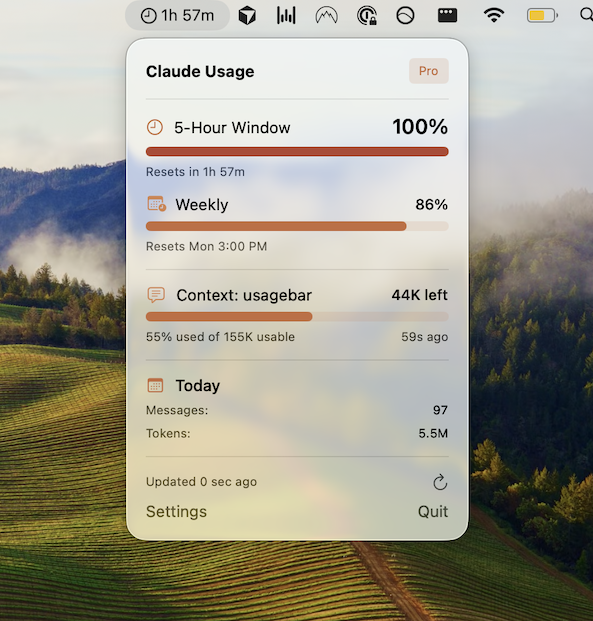
Checking your usage before a long sitemap generation session
Before kicking off a session that involves scanning a large route tree, it's worth checking how much of your Claude Code usage remains. You have a few options:
- Run
/usageinside Claude Code to see a summary of your current consumption (details on the /usage command) - Check claude.ai/settings/usage in your browser
- Use Usagebar to get a persistent, always-visible indicator in your menu bar without switching windows
Key takeaways
- Claude Code can write a complete
sitemap.xmlfrom a single, well-structured prompt - Specify your base URL, framework, and exclusions upfront to get clean output on the first pass
- Use
/addto feed routing config files directly and cut down on unnecessary token usage - For Next.js App Router, prefer a
sitemap.tsfile over static XML for dynamic content - Monitor your usage with the
/usagecommand or Usagebar before long sessions - Large sites (50,000+ URLs) need a sitemap index: ask Claude to split the output accordingly
Related guides
Never Get Locked Out Mid-Task Again
Never hit your usage limits unexpectedly. Usagebar lives in your menu bar and shows your 5-hour and weekly limits at a glance.
Get Usagebar$9 — one-time, lifetime updates