Claude Code vs Cursor: Pricing Comparison for Developers in 2026
In this article
- What is the difference between Claude Code and Cursor pricing?
- How does usage reset differ between Claude Code and Cursor?
- Which tool is actually cheaper: Claude Code or Cursor?
- What is better for your workflow: terminal-first or IDE-integrated?
- How to monitor your Claude Code usage to avoid lockouts
- Key takeaways: Claude Code vs. Cursor pricing
- Sources
Claude Code is the cheaper option for most developers when comparing pricing alone: Claude Pro is $17/month vs. Cursor Pro at $20/month. However, the real difference emerges in how usage is calculated. Claude Code charges by token consumption with optimization tools like prompt caching (90% savings) and batch processing (50% savings), while Cursor counts requests at fixed tiers. For developers running complex coding tasks regularly, Claude Code's unified subscription across all Claude products means no separate IDE cost.
Target Audience: Solo developers, engineering teams, and freelancers choosing between terminal-based agents (Claude Code) and IDE-integrated editors (Cursor).
Key Trade-offs: Cursor preserves VS Code workflows and supports multiple AI models. Claude Code offers agentic workflows with holistic codebase analysis but runs terminal-only without a graphical interface.
- Claude Pro: $17/month (6,480–6,696 messages/month)
- Cursor Pro: $20/month (500 premium requests/month)
- Claude Code Max: $100–200/month (4–20x usage limits)
What is the difference between Claude Code and Cursor pricing?
Claude Code integrates with Claude subscriptions, while Cursor operates as a standalone paid IDE. The fundamental difference is pricing structure:
Claude Code Pricing Model: Claude Code is included with Claude Pro ($20/month) and Claude Max ($100–200/month) subscriptions. You pay for token consumption, not per-request. For moderate usage (1.53M tokens/month), Sonnet 4 costs $13.78/month through Claude Code's API, versus $16.52/month through Cursor with a 20% markup. This gap widens for power users.
Cursor Pricing Model: Cursor charges fixed monthly fees: $20/month (Pro tier with 500 requests) or $200/month (Ultra tier). Request counting replaces token counting, making costs predictable but potentially expensive for users who hit limits quickly.
How does usage reset differ between Claude Code and Cursor?
This is where the tools diverge significantly. Claude Code resets usage every five hours—four "sessions" per day. This rolling window means developers can plan around predictable lockout windows during critical work.
Cursor provides a monthly budget model: you get a fixed number of requests per month, with usage rolling over or expiring at month-end depending on your plan tier.
The 5-hour lockout in Claude Code requires workflow planning to avoid mid-task interruptions—a pain point that many developers encounter when wrapping up pull requests or debugging sessions. Knowing your exact reset timer helps you optimize work within each window.

Which tool is actually cheaper: Claude Code or Cursor?
- Optimization tools: Claude Code's prompt caching and batch processing reduce token costs by up to 90% and 50% respectively. Cursor lacks these built-in optimizations.
- Holistic analysis: Claude Code analyzes your entire codebase before generating implementations across multiple files, including tests, reducing wasted requests.
- No IDE markup: Claude Code runs in your terminal, eliminating IDE subscription costs. Cursor requires the full IDE environment.
The math: A developer using 1.53M tokens monthly with optimization would spend $5.97/month on Claude Code (Sonnet 4) versus $16.52/month on Cursor with the same model at a 20% markup.
What is better for your workflow: terminal-first or IDE-integrated?
Choose Claude Code if:
- You want a terminal-first agent that analyzes your entire codebase before writing code
- You're willing to trade IDE integration for lower token costs and built-in optimization
- You handle complex refactoring or multi-file implementations regularly
- You value knowing exactly when your usage window resets (5-hour cycles)
Choose Cursor if:
- You prefer staying in VS Code with familiar extensions and workflows
- You want tab completion and granular control over edits (Cmd+K highlighting)
- You support multiple AI models (GPT-4, Gemini) in a single interface
- You want predictable monthly request budgets without rolling 5-hour windows
How to monitor your Claude Code usage to avoid lockouts
The 5-hour usage reset is Claude Code's key differentiator but also its main pain point. Hitting your limit mid-session creates the frustration of a 5-hour lockout during critical work. You can check usage limits via the /usage command in Claude Code, at claude.ai/settings/usage, or through third-party tools.
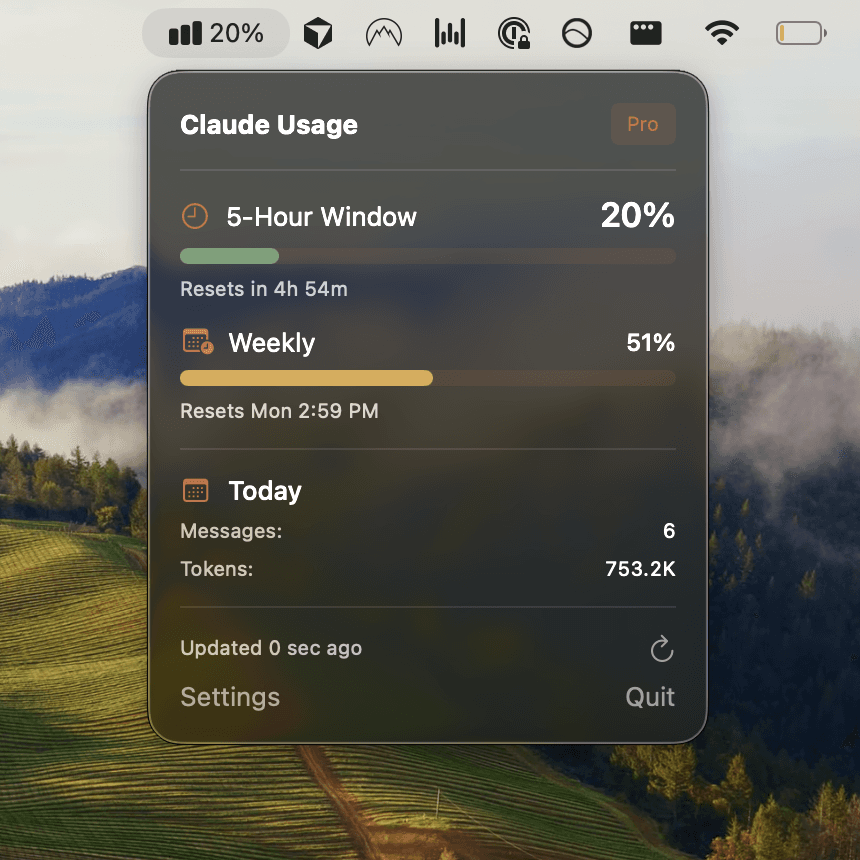
Smart usage monitoring prevents lockouts: Instead of waiting for surprise limit-hits, proactive monitoring tells you exactly when your next reset arrives. Usagebar provides smart notifications at 50%, 75%, and 90% usage thresholds, keeping you informed without context switching. The tool lives in your macOS menu bar, offering zero-distraction alerts integrated with secure Keychain credential storage.
With Usagebar, you know your reset window before hitting limits—critical when finalizing code reviews, shipping urgent fixes, or wrapping up sprint work. The tool is available with flexible, pay-what-you-want pricing (free for students), making usage tracking accessible regardless of budget.
Key takeaways: Claude Code vs. Cursor pricing
- Price tier: Claude Pro ($17–20/month) beats Cursor Pro ($20/month) slightly, but Claude Max ($100–200/month) offers significantly higher limits for power users.
- Usage model: Claude Code's token counting + optimization tools (prompt caching, batch processing) delivers better long-term value. Cursor's fixed request counts are predictable but less flexible.
- Workflow fit: Claude Code's terminal-first agent approach suits developers handling complex multi-file tasks. Cursor preserves VS Code workflows for developers preferring IDE integration.
- Reset windows: Claude Code's 5-hour rolling resets require workflow planning. Monitor usage proactively to avoid mid-task lockouts.
- Best practice: Track your Claude Code usage with smart alerts to stay within limits and prevent the frustration of task interruptions.
Ready to optimize your Claude Code experience? Get Usagebar for instant usage tracking, reset timers, and smart notifications—all in your macOS menu bar with pay-what-you-want pricing.
Sources
- Apidog: Is Claude Code Really Cheaper than Cursor?
- Builder.io: Cursor vs Claude Code Comparison
- Anthropic Support: Using Claude Code with Pro/Max Plans
- Qodo: Claude Code vs Cursor Deep Comparison
- DEV Community: Claude Code vs Cursor Cost Comparison
- Usagebar: When Does Claude Code Usage Reset?
- Usagebar: Claude Code Weekly Limit vs 5-Hour Lockout
Never Get Locked Out Mid-Task Again
Never hit your usage limits unexpectedly. Usagebar lives in your menu bar and shows your 5-hour and weekly limits at a glance.
Get Usagebar$9 — one-time, lifetime updates