Claude Pro vs Max Limits: Which Plan is Right for Your Coding Workflow?
The choice between Claude Pro and Max plans comes down to usage capacity and model access. Pro is ideal for developers with moderate, predictable workflows at $20/month. Max 5x ($100/month) offers 5 times more usage per session, while Max 20x ($200/month) provides 20 times more. The biggest differentiator: Max subscribers get unrestricted access to the Claude Opus model for complex tasks, whereas Pro is limited to Sonnet. Both plans share usage limits across Claude.ai and Claude Code, resetting on a five-hour session basis and weekly ceiling.
Understanding Pro vs Max usage capacity
Claude plans operate on a dual-layer system. Each plan has a five-hour session limit that controls burst activity and a seven-day weekly ceiling that caps total active compute hours. This means you can't simply burn through your weekly allowance in a single sprint without hitting the session cap.
Pro Plan: Offers baseline usage capacity sufficient for steady development work, testing, and debugging. The limit resets every five hours within a seven-day window. If you consistently hit these limits, you can upgrade to Max 5x mid-cycle without losing progress.
Max 5x Plan: Multiplies your Pro session limit by five, making it suitable for intensive coding sessions, complex refactoring, or managing multiple parallel projects. At $100/month, it's the sweet spot for solo developers and small teams doing heavy Claude Code work.
Max 20x Plan: The top tier at $200/month, offering 20x the Pro session capacity. Designed for agencies, enterprises, and developers running dozens of concurrent Claude Code tasks or handling full application rewrites in a single session.
Model access: Sonnet vs Opus differences
A critical distinction often overlooked is model availability. The Pro plan includes access to Claude Sonnet, a capable general-purpose model built for balanced performance across coding tasks. However, Pro users cannot access Claude Opus.
Max plan subscribers get unrestricted access to Claude Opus, which is purpose-built for deep architectural reasoning, complex refactoring, and advanced problem-solving. This matters when you need to rethink infrastructure, design intricate systems, or debug deeply nested logic. Sonnet can handle most tasks, but Opus excels at the hardest ones.
Both Pro and Max include Claude Code for terminal-based coding workflows, but only Max subscribers can fully leverage the Opus model for complex development challenges.
Max plan exclusive features beyond limits
Max subscribers gain perks beyond raw capacity:
- Priority access to new models – Early access to bleeding-edge model releases before general availability
- Cowork (preview) – Delegate tasks to Claude with local file system access on macOS, enabling hands-off automation of complex work
- Two weekly limits – Max plans include separate limits for general usage and Sonnet-only usage, giving you better control over token distribution
When to stay on Pro vs when to upgrade to Max
Keep Pro if: You're writing code daily but within predictable, focused sessions. Pro works well for feature development, bug fixes, and learning. You don't mind occasionally hitting limits or switching to pay-as-you-go for intensive sprints.
Upgrade to Max 5x if: You hit Pro limits multiple times per week during normal work. You're juggling multiple projects simultaneously in Claude Code. You need reliable, uninterrupted access during critical work like wrapping up a PR or debugging production issues. You want access to Opus for complex architectural decisions.
Upgrade to Max 20x if: You run dozens of Claude Code sessions weekly. You're an agency or team managing multiple client projects concurrently. You need Opus access for nearly every complex task. Raw capacity and priority access to new models is worth the investment.
Monitoring your usage across Pro and Max
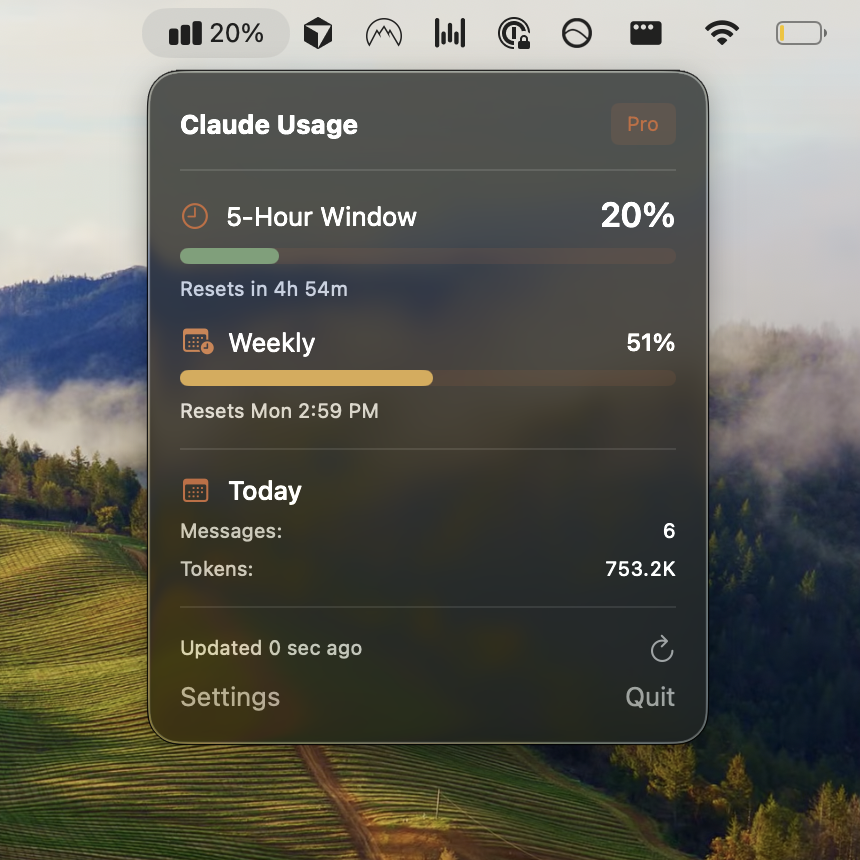
Both Pro and Max plans expose real-time usage tracking at Settings > Usage on claude.ai. This shows your session progress and weekly remaining capacity. However, if you're using Claude Code heavily, tracking consumption across the terminal adds friction.
Many developers struggle to know when they're approaching limits until they hit a five-hour lockout mid-sprint. This is where Usagebar helps. It monitors your Claude usage directly from the macOS menu bar, sending smart notifications at 50%, 75%, and 90% usage thresholds. This prevents surprise lockouts and keeps you in flow. Usagebar works with Pro, Max, and pay-as-you-go plans, and supports both students (free) and professionals (pay what you want).
Following best practices like batching related tasks, leveraging caching in projects, and being specific in prompts stretches your limits further. But knowing when you're close to the ceiling is equally important.
Pay-as-you-go flexibility
Neither Pro nor Max is your only option. You can switch to pay-as-you-go pricing at any time for intensive coding sprints, then return to a plan afterward. This is useful for developers who hit limits unpredictably or need burst capacity for specific projects without committing to Max all month.
The tradeoff: pay-as-you-go costs more per message than a subscription plan, so it's best for occasional overages, not routine work.
The five-hour session limit reality
Regardless of plan, every subscription hits a five-hour session reset. This isn't just a usage cap—it's a throttling mechanism that prevents extreme bursts. Even Max 20x subscribers will pause after five hours of intense Claude Code use within a window, then resume after the reset.
Understanding this prevents frustration. If you're deep in a debugging session and hit the cap, you're not locked out forever—just for the next five-hour window. Planning work around these windows, or using multiple focused sessions separated by breaks, keeps momentum.
Key takeaways
- Pro ($20/mo) is baseline capacity; Max 5x ($100/mo) is 5x higher; Max 20x ($200/mo) is 20x higher, all within a five-hour session window and weekly ceiling
- Only Max plans include unrestricted Opus access—critical for complex architectural decisions and deep refactoring
- Both plans share limits across Claude.ai and Claude Code, so heavy terminal use eats into your web usage
- Real-time monitoring with Usagebar prevents surprise lockouts by alerting at 50%, 75%, 90% consumption thresholds
- Five-hour session resets apply to all plans; plan work accordingly or upgrade to Max for breathing room
- Best practices like batching, caching, and specificity stretch any plan further
Related reading
- How to check your Claude Code usage limits
- When does Claude Code usage reset?
- Claude Code weekly limit vs 5-hour lockout explained
- Best Claude Code slash commands for developers
Sources
- What is the Max plan? – Claude Help Center
- Using Claude Code with your Pro or Max plan – Claude Help Center
- Usage limit best practices – Claude Help Center
- Claude Pricing 2025: Full guide to Free, Pro, Team, and Max plans with updated limits
- Everything We Know About Claude Code Limits – Portkey
- Claude Pro vs Max: Which AI Plan is Best for Developers? – ArsTurn
Track Your Claude Code Usage
Never hit your usage limits unexpectedly. Usagebar lives in your menu bar and shows your 5-hour and weekly limits at a glance.
Get Usagebar