Claude Usage Credits vs Subscription: Which One Should You Pick in 2026?
In this article
- What's the difference between claude usage credits and a subscription?
- How much does each option cost?
- Who should use a Claude Pro or Max subscription?
- Who should use API usage credits instead?
- What happens when you hit your claude subscription limit?
- Key takeaways
- How do you avoid getting cut off mid-session?
- Sources
A Claude subscription (Pro or Max) is a flat monthly fee that gives you Claude.ai and Claude Code access within a rolling 5-hour window plus a weekly cap, while API usage credits are pay-per-token billing through the Anthropic Console with no fixed ceiling. Most individual developers and daily Claude Code users should start with Pro or Max for predictable costs, then add Console credits only if they consistently hit limits mid-week. Heavy automation, CI pipelines, or teams running agents at scale usually do better on credits from day one.
- Claude Pro: $20/month ($17/mo billed annually) for Claude.ai + Claude Code on a 5-hour rolling limit.
- Claude Max: $100/month (5x Pro) or $200/month (20x Pro) for higher Claude Code throughput.
- API/Console credits: billed per million tokens (e.g., Claude Sonnet and Opus models), no monthly cap, scales with actual usage (Anthropic pricing).
What's the difference between claude usage credits and a subscription?
A subscription (Pro/Max) is a flat monthly price with usage measured against a rolling 5-hour window and a weekly cap, not against token counts you can see in real time. Usage credits are prepaid or pay-as-you-go balances in the Anthropic Console that get drawn down per token, with pricing varying by model (Anthropic Docs).
Subscriptions are built for the Claude.ai web app and Claude Code; credits are built for the API, SDKs, and any workflow that calls Claude programmatically. You can hold both: a Pro/Max plan for daily chat and coding, and a separate Console balance for scripts, agents, or overflow usage once your subscription limit resets (Claude Code + Pro/Max support article).
How much does each option cost?
Subscriptions cost a fixed $20-$200 per month regardless of exact token usage, as long as you stay under the rolling 5-hour and weekly caps. API credits cost whatever your actual token consumption totals, billed per million input/output tokens at rates set per model, so a quiet month costs little and a heavy automation month can cost far more than a subscription.
| Plan type | Price | Best for | Usage ceiling |
|---|---|---|---|
| Claude Pro | $20/mo | Solo developers, light-to-moderate daily coding | Rolling 5-hour window + weekly cap |
| Claude Max 5x | $100/mo | Full-time Claude Code users | ~5x Pro's throughput per window |
| Claude Max 20x | $200/mo | Power users running multiple agent sessions | ~20x Pro's throughput per window |
| API / Console credits | Pay-per-token | CI, automation, teams, high-volume scripting | No fixed cap, limited by account spend/rate limits |
Exact per-token rates change as Anthropic ships new models, so check the live Anthropic pricing page before estimating a monthly bill. As of October 2026, Pro and Max remain the simplest option for anyone whose usage fits inside Claude Code's rolling windows.
Who should use a Claude Pro or Max subscription?
Developers who use Claude Code as their primary coding assistant throughout the workday should default to a subscription. It's a predictable, flat cost, and Max's higher tiers exist specifically to reduce how often you hit the rolling 5-hour or weekly cap during heavy coding sessions.
- Solo developers coding most of the day: Pro or Max 5x
- Users running multiple parallel Claude Code sessions or agents: Max 20x
- Anyone who wants one bill instead of tracking per-token spend
Who should use API usage credits instead?
Teams building products on Claude, running CI/CD pipelines, batch jobs, or agent fleets should use Console credits, because that usage pattern is spiky and programmatic rather than a single person coding interactively. Credits also make sense once a Pro/Max subscriber repeatedly maxes out their weekly cap and needs overflow capacity (source).
Anthropic lets Pro and Max subscribers link a Console account so Claude Code can draw on paid credits once the subscription's rolling or weekly limit is reached, instead of forcing a full stop until reset.
What happens when you hit your claude subscription limit?
Once you hit the 5-hour or weekly cap on Pro/Max, Claude Code either pauses until the next reset window or, if you've linked billing, starts drawing from Console credits for the overflow. Knowing exactly when your window resets is the difference between waiting idle and planning around it. Our guide on when Claude Code usage resets breaks down the 5-hour and weekly cycles in detail, and weekly limit vs 5-hour lockout explains which cap is actually blocking you.
Key takeaways
- Subscriptions (Pro $20, Max $100/$200) are flat-rate and capped by a rolling 5-hour window plus weekly limit.
- API/Console credits are metered per token with no fixed ceiling, suited to automation and high-volume use.
- You can combine both: subscription for daily coding, credits for overflow once the cap is hit.
- Check your remaining usage before it runs out instead of discovering a lockout mid-task.
How do you avoid getting cut off mid-session?
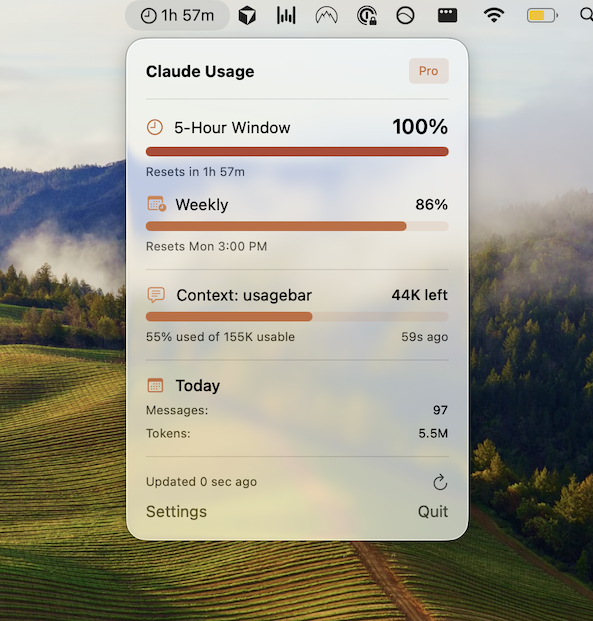
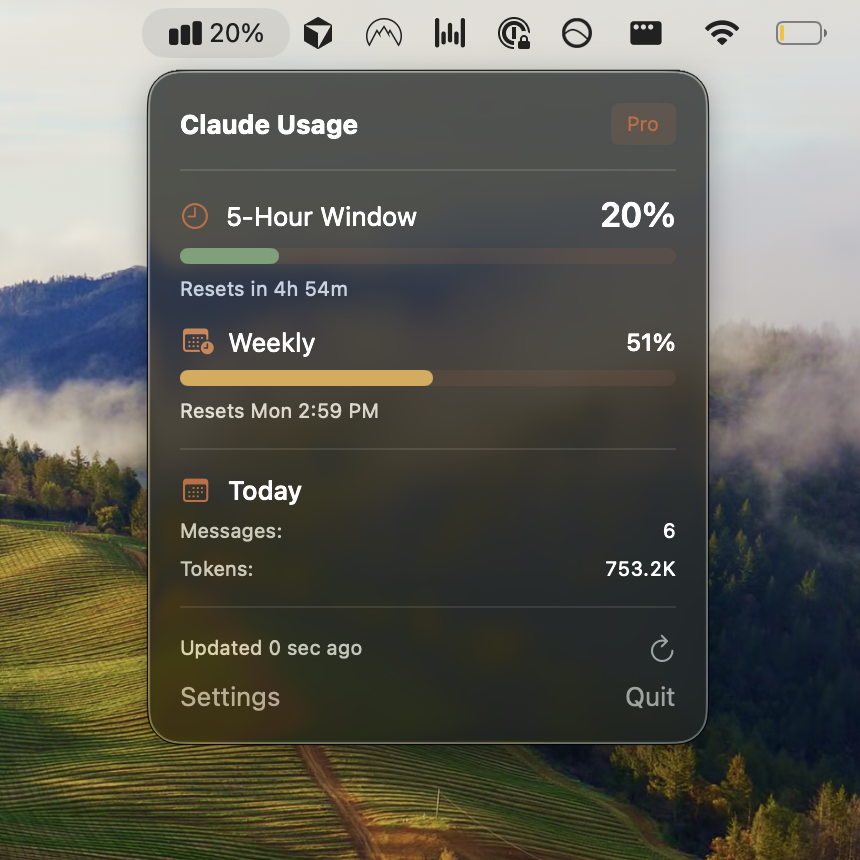
The most common complaint from Pro/Max subscribers isn't the price, it's hitting the 5-hour or weekly cap unexpectedly in the middle of a coding session. Usagebar sits in your macOS menu bar and tracks your Claude Code 5-hour window, weekly cap, and context usage in real time, with alerts at 50%, 75%, and 90% so you know whether you need to slow down, switch models, or top up with Console credits before you're forced to stop.
It's a one-time $9 purchase, no subscription of its own. If you'd rather see the numbers before Claude Code throws an error, get Usagebar.
For more on how subscription limits actually work day to day, see does Claude Code usage affect Pro limits and how to check your Claude Code usage limits.
Sources
Find Out Before You’re Locked Out, Not After
Checking your usage means stopping what you’re doing to go look. Usagebar keeps your 5-hour and weekly limits in the menu bar while you work, and alerts you at 50%, 75%, and 90% — so a lockout never lands mid-task.
Get Usagebar$9 — one-time, lifetime updates