Is Claude Code Better Than Cursor? The 2026 Comparison Guide
In this article
Claude Code is better than Cursor for large-scale refactoring, autonomous debugging, and batch-processing tasks—but Cursor wins for real-time IDE integration and interactive pair programming. The honest answer: they solve different problems. Claude Code is an autonomous agent in your terminal; Cursor is VS Code rebuilt with AI. For developers choosing between them, the decision comes down to your workflow. If you need a reasoning engine that can handle complex projects hands-off, Claude Code wins. If you want AI assistance inside your editor, Cursor wins. The hidden problem both face: usage limits that can lock you out for 5 hours during critical work. Usagebar solves this by monitoring your limits in real-time.
- Architecture: Claude Code is a CLI agent; Cursor is an AI-enhanced VS Code fork
- Pricing: Cursor costs $20/month; Claude Code Max costs $100–200/month
- Token Efficiency: Claude Code uses 5.5x fewer tokens than Cursor for equivalent tasks
- Usage Tracking: Both tools consume limits that reset weekly—Usagebar prevents the 5-hour lockout
What is Claude Code, and how does it differ from Cursor?
Claude Code is Anthropic's command-line tool that gives you access to Claude models directly in your terminal. It operates as an autonomous agent capable of reading entire codebases, editing multiple files simultaneously, executing commands, and committing changes to git—all without your direct intervention for each step.
Cursor, by contrast, is VS Code rebuilt with AI integrated directly into the editor. It's designed for interactive development where you drive the car and AI assists in real-time. There's no autonomous agent here—just contextual code generation, inline suggestions, and chat-based assistance within the IDE.
The Architecture Difference
Claude Code: No GUI. No buttons. Just your terminal and an AI that can see your entire codebase, understand dependencies across files, and act autonomously. You stay in the loop for supervision and direction, but the AI handles the execution.
Cursor: Stays inside the editor. You write code; AI suggests completions, refactors, and explanations inline. It's RAG-like—Cursor gathers context from your local filesystem to provide relevant suggestions in real-time.
This fundamental difference shapes everything: Claude Code shines for batch operations and complex reasoning; Cursor shines for flow state and in-editor productivity.
How do Claude Code and Cursor compare on code quality and performance?
The token efficiency argument strongly favors Claude Code. Claude Code used 5.5x fewer tokens than Cursor for the same task and finished faster with fewer errors. This translates directly to cost savings and speed, especially for larger codebases.
Developers describe Claude Code's output as more "production-ready," with approximately 30% less code rework compared to other tools. However, one important caveat: engineers who use both tools daily report no significant difference in code quality when tasks are clearly defined and structured. The limiting factor is often the quality of the prompt, not the tool.
Real-World Performance
In benchmark tests, Claude Code completed refactoring tasks faster than Cursor, particularly for multi-file operations. Cursor excels when you need incremental suggestions and contextual completions, but for sweeping changes, Claude Code's autonomous approach wins. The trade-off: Cursor keeps you in flow during interactive work, while Claude Code requires delegation and patience.
What about pricing and usage limits?
Cursor costs $20/month. Claude Code Max costs $100–200/month through Anthropic's subscription plans. That's a 5–10x price difference, but Claude Code's 5.5x token efficiency partially offsets this gap.
However, both tools face a critical hidden cost: usage limits that reset weekly. If you hit your limit, you're locked out for up to 5 hours during critical work—merging PRs, shipping features, debugging production issues. This is where most developers discover real pain.
The Usage Limit Problem
All activity in Claude on the web and Claude Code counts against the same allocation. Switching between web chat, Claude Code, and mobile drains the same pool. Most developers don't realize this until they hit the wall.
The frustration sets in fast: you're wrapping up a critical feature, you need one more refactoring pass, and Claude Code returns "Rate limited. Try again in 5 hours." By then, your team is waiting, the deadline's closer, and context switching kills momentum.
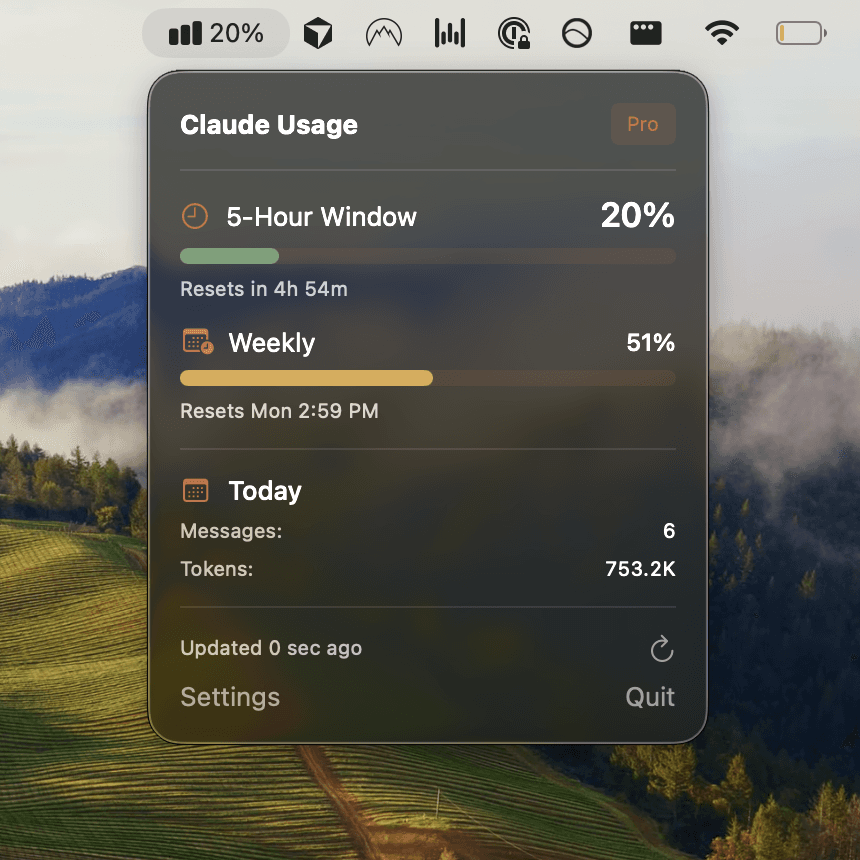
This is exactly what Usagebar solves. The tool sits in your macOS menu bar and shows real-time usage tracking with smart alerts at 50%, 75%, and 90% capacity. You never hit that wall again. You know exactly when your limits reset and can plan your work accordingly.
Which should you choose: Claude Code or Cursor?
The answer depends on your workflow:
Choose Claude Code if:
- You need autonomous, large-scale refactoring across multiple files
- You're building tests or debugging complex issues independently
- You prefer a reasoning engine that can think through problems end-to-end
- Token efficiency and cost-effectiveness matter for your use case
- You work from the terminal and want to stay there
Choose Cursor if:
- You want real-time IDE integration and inline suggestions
- You prioritize staying in editor flow state
- You need contextual completions while writing code interactively
- The $20/month price point is a priority
- You're comfortable with VS Code and want AI built into it
The Real Talk
Many developers don't have to choose anymore. You can use both: Claude Code for big batch operations and Cursor for interactive development. The limiting factor isn't the tools—it's the usage limits both share. This is why Usagebar has become essential for serious Claude Code users. It monitors your usage in real-time, alerts you before you hit limits, and shows exactly when your window resets. No more surprises. No more 5-hour lockouts.
How Usagebar prevents the hidden frustration
You've just switched from web chat to Claude Code to power through refactoring. Thirty minutes in, you hit a rate limit. 5 hours. Your PR sits open. Your team's blocked. Context switches. Momentum dies.
Usagebar lives in your macOS menu bar and eliminates this problem entirely. It shows:
- Real-time usage percentage (50%, 75%, 90% alerts)
- Exact timestamp when your limits reset
- Which product you've used (Claude web, Claude Code, or both)
No guessing. No surprises. No more wrapping up critical work only to discover you're locked out.
Flexible Pricing, Free for Students
Usagebar operates on a pay-what-you-want model. Pay $5, $15, or whatever works for you. Students get free access. The idea is simple: if a tool saves your workflow, you should be able to afford it.
The Secure Alternative to Manual Tracking
Some developers check their usage manually by running /usage in Claude Code or navigating to claude.ai/settings/usage. Both work, but they interrupt flow. Usagebar uses macOS Keychain to securely store your credentials and runs silently in the background. No context switching. No remembering to check.
Key takeaways
- Claude Code wins on autonomy and token efficiency – it uses 5.5x fewer tokens than Cursor for equivalent tasks and handles large-scale refactoring better.
- Cursor wins on IDE integration and interactive flow – real-time suggestions and inline assistance keep you productive without leaving the editor.
- Pricing heavily favors Cursor – at $20/month vs $100–200/month, Cursor is significantly cheaper, though Claude Code's efficiency partially offsets this.
- Both tools share the same critical problem: usage limits that can lock you out for 5 hours during critical work.
- Get Usagebar to prevent lockouts – monitor your usage in real-time, receive smart alerts, and never hit the rate limit wall again. Pay what you want. Free for students.
Sources
- Using Claude Code with your Pro or Max plan – Anthropic Support
- Claude Code vs Cursor: Complete comparison guide in 2026 – Northflank Blog
- When does Claude Code usage reset? – Usagebar Blog
- Claude Code Weekly Limit vs 5-Hour Lockout – Usagebar Blog
- How do I check my Claude Code usage limits? – Usagebar Blog
- Usagebar – Monitor Claude Code usage in your macOS menu bar
Never Get Locked Out Mid-Task Again
Never hit your usage limits unexpectedly. Usagebar lives in your menu bar and shows your 5-hour and weekly limits at a glance.
Get Usagebar$9 — one-time, lifetime updates