How to use Claude Code for Python development
In this article
Claude Code is Claude's agentic coding tool that runs directly in your terminal, IDE, or browser, making it ideal for Python developers who want to stay in flow without context switching. With Claude Opus 4.5 powering the backend, you get intelligent file editing, command execution, and git integration right from your development environment. Pro and Max subscribers can use Claude Code at no extra cost within their existing usage limits – the key is understanding how those limits work so you don't hit the infamous 5-hour lockout mid-project.
- Claude Code works in terminal, VS Code, JetBrains IDEs, desktop app, and browser
- Pro/Max subscribers share usage limits across Claude web and Claude Code combined
- Direct file editing, command execution, and git commits all managed in-terminal
Setting up Claude Code for Python projects
Getting Claude Code running takes 30 seconds. Install via curl (macOS/Linux/WSL), Homebrew, WinGet, or your package manager. Once installed, navigate to your Python project directory and run claude to authenticate with your Claude subscription credentials.
Setting up Claude Code on your macOS terminal involves the same process – authenticate once and you're connected to your Pro or Max plan. The tool automatically detects your project structure and maintains awareness of your entire codebase, making context switches minimal.
Authentication and setup steps
- Install Claude Code using the native installer (recommended for auto-updates) or a package manager
- Run
claudein your project directory and log in with your Claude credentials - Verify setup by running
claude --version - Optional: Install extensions for VS Code or JetBrains if you prefer IDE integration
Critical note: Make sure you don't have an ANTHROPIC_API_KEY environment variable set, or Claude Code will use API credits instead of your subscription, triggering separate charges outside your plan.
Common Python workflows with Claude Code
Python developers use Claude Code for everything from scaffolding new projects to debugging complex issues. Tell Claude what you need in plain English – it reads your codebase, makes a plan, implements the changes, and ensures everything works.
Build features from natural language
Instead of writing boilerplate from scratch, describe what you want. "Add JWT authentication to my FastAPI app with proper error handling" – Claude Code will examine your existing structure, write the implementation, integrate it cleanly, and run tests to verify.
Debug and fix issues
Paste an error message or describe unexpected behavior. Claude Code navigates your codebase, identifies root causes, and implements fixes. The challenge is knowing your usage limits before you hit them – this is where monitoring becomes critical.
Navigate and understand codebases
Ask Claude about your entire project – "What does this service do?" or "Where are database queries executed?" Claude Code answers by reading your files, understanding context, and providing accurate summaries without context switching to multiple files yourself.
Automate tedious tasks
Fix linting violations across your codebase, resolve merge conflicts, write release notes, or generate documentation. Claude Code slash commands let you customize workflows and chain tasks together efficiently.
Understanding Claude Code usage limits
Your Pro or Max subscription includes monthly usage limits that apply across both Claude web and Claude Code combined. When you approach limits, you risk hitting the 5-hour lockout that prevents further usage until your limit resets.
How Pro and Max limits work
- Pro: ~40 messages per day (approximately 3,200 tokens per day for complex tasks)
- Max: ~200 messages per day with 5x higher limits than Pro
- Limits reset weekly (Monday 12:00 AM UTC)
- Usage counts for both claude.ai and Claude Code equally
Every prompt in Claude Code counts toward your limit. A simple one-line fix might use 1-2 messages, while complex multi-file refactoring could use 5-10. When does Claude Code usage reset? – weekly at Monday 12:00 AM UTC, so plan accordingly for critical deadlines.
Monitoring usage before hitting the wall
Check your usage at claude.ai/settings/usage, or run /usage directly in Claude Code. Check your Claude Code reset timer to know exactly when your weekly limit resets. The problem: these native tools show raw numbers without context about how many tasks you can complete before hitting the 5-hour lockout.
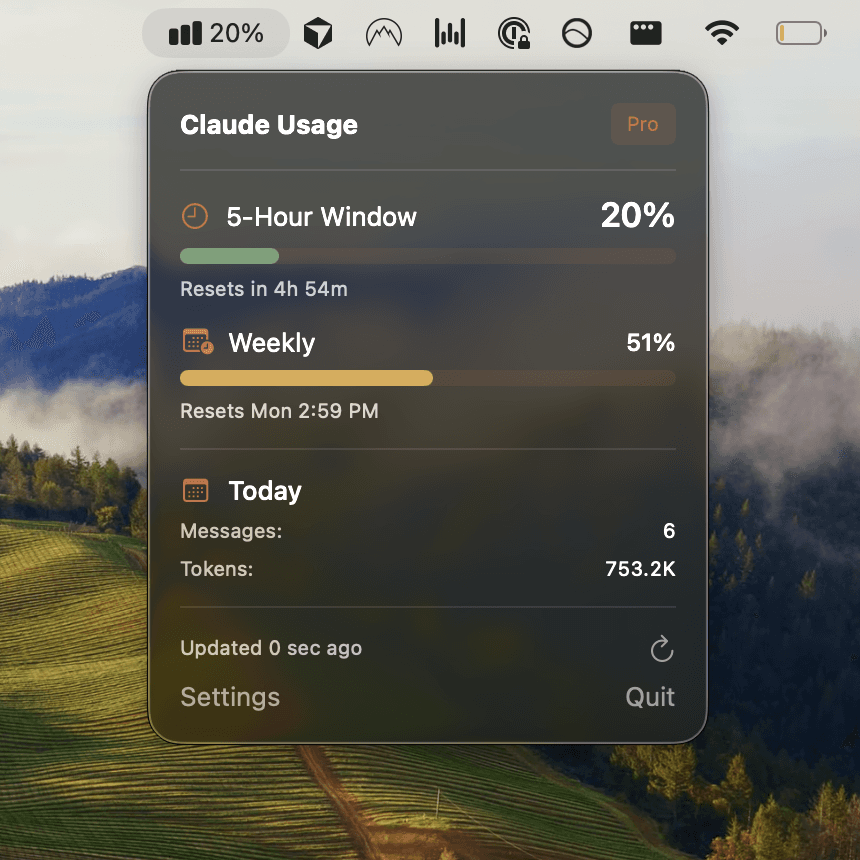
Switching from Cursor to Claude Code CLI? Many developers choose Claude Code for its superior Python capabilities but struggle with usage management. This is where Usagebar solves a critical pain point – it shows your usage as a percentage (50%, 75%, 90% alerts) directly in your macOS menu bar, and uses Keychain to securely store credentials. No API key management, no manual checks – just instant visibility without breaking flow.
Pro tips for Python developers using Claude Code
Stay within limits by batching tasks strategically
Group related tasks together. Instead of asking Claude to add a feature, then debug it, then optimize it separately, describe the complete workflow: "Add this feature, ensure it passes tests, and optimize for performance." This reduces message count and keeps changes coherent.
Use Claude Code in your IDE for tighter feedback loops
The Claude Code VS Code extension and JetBrains plugin show diffs inline, letting you review changes before applying them. This prevents accidental overwrites and reduces the need for follow-up fixes.
Leverage git integration
Claude Code can create commits automatically. Use this to checkpoint your work – after each significant feature, ask Claude to commit with a clear message. This makes it easier to review changes and roll back if needed, plus it documents your workflow.
Monitor your weekly reset schedule
Know when your limit resets (Monday 12:00 AM UTC). Plan complex refactoring or large feature development for the day after reset when you have maximum capacity. If you're approaching a deadline on Sunday, you risk running out of messages – checking your reset timer prevents this frustration.

Combine Claude Code with Python-specific tools
Use Claude Code to generate structure and handle complex logic, then lean on your existing linters (Black, Pylint), type checkers (mypy), and test frameworks (pytest) for validation. Claude Code respects your project's conventions and integrates with whatever your team already uses.
Avoiding the 5-hour lockout on Pro and Max plans
The most frustrating experience: finishing 80% of a critical PR at 4:58 PM, running out of usage, and hitting the 5-hour lockout. You can't continue until next week's reset. This isn't a technical limitation – it's a usage management problem.
The solution: real-time monitoring. Instead of checking claude.ai/settings/usage manually (which breaks flow) or waiting until you hit the limit, Get Usagebar to see usage percentage directly in your macOS menu bar with smart 50%, 75%, 90% alerts. The tool uses macOS Keychain to securely store credentials, offers flexible pay-what-you-want pricing, and free access for students. Download instantly and stay in flow.
Key takeaways
- Claude Code works in terminal, IDE, or browser – choose based on your workflow preference
- Pro and Max usage limits apply across Claude web and Claude Code combined – monitor closely
- Weekly limits reset Monday 12:00 AM UTC – plan critical work around this schedule
- Use smart task batching and IDE integration to minimize message usage
- Real-time usage monitoring prevents the 5-hour lockout frustration
- Usagebar eliminates context-switching for usage checks with menu bar alerts and secure credential storage
Sources
Never Get Locked Out Mid-Task Again
Never hit your usage limits unexpectedly. Usagebar lives in your menu bar and shows your 5-hour and weekly limits at a glance.
Get Usagebar$9 — one-time, lifetime updates